



Quick Answer: A CNC milling machine is a computer-controlled tool that uses a rotating cutter to precisely carve a block of solid material (like metal or plastic) into a final, high-precision part. Think of it as a robotic sculptor that follows a digital blueprint to remove everything that isn’t the finished product.
Here at RM (Rapid Manufacturing), CNC milling machines are the heart of our operation. They are the workhorses that transform a client’s digital design into a tangible, functional component that can withstand the harshest engineering demands. We’ve spent decades programming, operating, and pushing these machines to their limits. In this guide, we’ll pull back the curtain and show you not just what they do, but how they form the bedrock of modern manufacturing.
The Core Concept: Subtractive Manufacturing Perfected
To truly understand what a CNC mill does, you first have to grasp the concept of subtractive manufacturing. It’s a simple but profound idea: you start with more material than you need and systematically cut away, or subtract, the excess until only your desired shape remains.
The most intuitive analogy is that of a sculptor. A sculptor starts with a solid block of marble and, with a chisel and hammer, chips away everything that doesn’t look like a statue. A CNC milling machine does the exact same thing, but with engineering-grade precision, superhuman speed, and unwavering repeatability.
This stands in direct contrast to its more famous counterpart, additive manufacturing (or 3D printing). An additive process starts with nothing and builds a part layer by layer, like constructing a building with LEGOs.
- Subtractive (CNC Milling): Starts with a solid block -> Removes material -> Final part.
- Additive (3D Printing): Starts with an empty platform -> Adds material layer by layer -> Final part.
This fundamental difference is why CNC milling is the dominant process for creating strong, load-bearing metal parts. The final component retains the solid, uninterrupted grain structure of the original material block, giving it superior mechanical properties compared to the layered structure of a 3D print.
Deconstructing the “CNC” in CNC Milling
The term “CNC” is thrown around constantly, but what does it actually mean? Breaking it down reveals the magic behind the machine’s precision. CNC stands for Computer Numerical Control.
- Computer: This is the brain of the operation. Instead of a human machinist manually turning cranks and levers to guide the cutting tool, a powerful onboard computer reads a set of digital instructions. This computer can execute thousands of precise movements per second without fatigue or error.
- Numerical: This refers to the language the computer speaks. The instructions are given in the form of coordinates and codes—a language known as G-code. Each line of G-code tells the machine exactly where to move in three-dimensional space (e.g., “move to X=50mm, Y=25.5mm, Z=-10mm”), how fast to move, and when to turn the spindle on or off. It’s a highly specific, number-based instruction set.
- Control: This is the result. The computer takes the numerical instructions and uses them to control the machine’s motors and actuators with incredible precision. This control system is what allows a 2-ton machine to carve metal with an accuracy of just a few microns (a fraction of the width of a human hair).
So, “CNC Milling” isn’t just milling; it’s a process where a computer uses a numerical program to control the precise, automated, and repeatable subtraction of material.
The Anatomy of a CNC Milling Machine: The Key Players
To understand what the machine does, it helps to know its key parts. While they come in many shapes and sizes, from small desktop units to room-sized industrial behemoths, nearly all CNC mills share the same fundamental components.
The Spindle: The Heart of the Operation
The spindle is the powerful, high-speed motor that holds and spins the cutting tool. Its speed, measured in Revolutions Per Minute (RPM), is a critical variable in the milling process. Spindles on industrial machines can spin anywhere from a few thousand RPM for cutting tough steels to over 30,000 RPM for high-speed aluminum machining. The spindle’s power (or torque) determines how aggressively it can push the cutter through the material.

The Cutting Tool: The Scalpel
Attached to the spindle is the cutting tool, often called an end mill. These are not simple drill bits. An end mill is a highly engineered tool with multiple sharp cutting edges (called flutes) designed to cut sideways as well as downwards. They come in thousands of variations, each designed for a specific task:
- Flat End Mills: For creating flat surfaces and pockets.
- Ball End Mills: With a rounded tip for creating smooth, curved, and organic surfaces.
- Drills: For creating holes.
- Taps: For cutting internal threads into a hole.
- Face Mills: Large-diameter cutters used to quickly create a perfectly flat top surface on a block of material.
The selection of the right cutting tool is a critical skill in CNC machining.
The Workpiece and Vise: The Patient
The workpiece is the raw block of material that will be transformed into the final part. To ensure it doesn’t move a single micron during the intense cutting process, it must be rigidly clamped to the machine’s table. This is most often done using a powerful, high-precision vise. The process of securely holding the workpiece is known as fixturing.
The Machine Axes: The Robotic Arms
The magic of CNC milling lies in its ability to move the cutting tool and the workpiece relative to each other in three-dimensional space. This movement occurs along axes:
- X-Axis: Left and right movement.
- Y-Axis: Forward and backward movement.
- Z-Axis: Up and down movement.
A standard machine is a 3-axis mill, which is perfect for a huge variety of parts. More advanced machines introduce rotational axes for even greater complexity:
- 4-Axis Mill: Adds a rotational axis (the A-axis), allowing the workpiece to be spun, which is useful for cutting features around a cylinder.
- 5-Axis Mill: Adds two rotational axes (A and B, or B and C). This allows both the tool and the workpiece to tilt and rotate in complex ways, enabling the machine to reach almost any surface of the part in a single setup. This is the pinnacle of CNC milling, used for creating incredibly complex geometries like turbine blades and medical implants.
In the first part of our guide, we deconstructed the CNC milling machine itself, exploring its core components from the spindle to the axes. We established what the machine is. Now, we will dive into the most critical part of the process: the step-by-step workflow that transforms a simple digital file into a high-precision, functional component. This is where the true skill of a machinist and programmer comes to life.
The Workflow: From Digital Blueprint to Physical Part
A common misconception is that a user simply uploads a 3D model to a CNC mill and hits “print.” The reality is a sophisticated, multi-stage process that blends digital design, strategic manufacturing planning, and skilled hands-on setup. This workflow can be broken down into two main phases: the digital (CAD/CAM) and the physical (Setup/Machining).
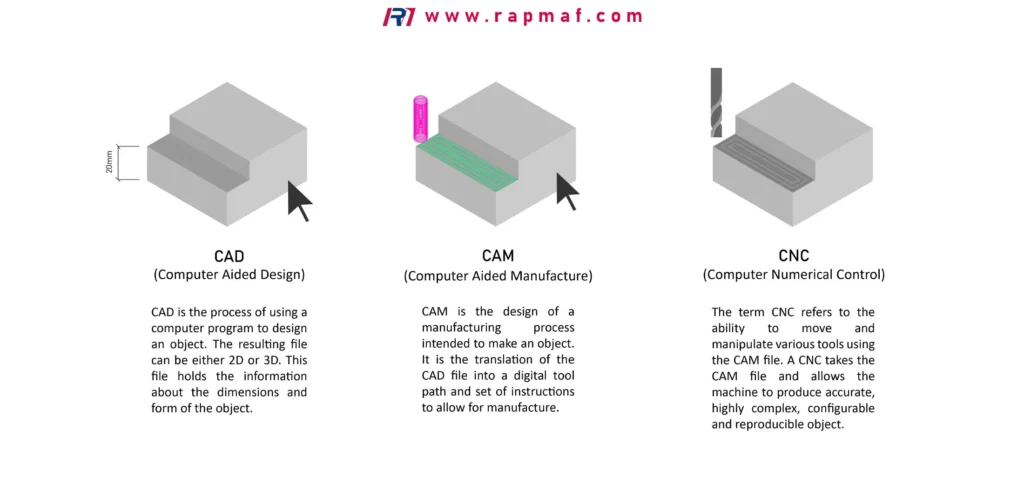
Step 1: The Design (CAD – Computer-Aided Design)
Every single CNC milled part begins its life as a digital 3D model. This model is the master blueprint, the ultimate source of truth from which all other steps are derived. It is created in CAD (Computer-Aided Design) software like SolidWorks, Autodesk Fusion 360, or CATIA.
In the CAD environment, a designer or engineer meticulously defines every feature of the part: its exact dimensions, the radius of every curve, the location of every hole, and the angle of every chamfer. Critically, the CAD model also includes tolerances. A tolerance is the acceptable range of variation for a given dimension. For example, a hole might be specified as 10mm ±0.05mm, meaning the final machined hole can be anywhere from 9.95mm to 10.05mm and still be considered a good part.
The precision of the final product is born here. If the CAD model is inaccurate, the final part will be inaccurate, no matter how advanced the CNC machine is. Once complete, the model is typically saved in a universal format like STEP or IGES, ready for the next crucial stage.
Step 2: The Strategy (CAM – Computer-Aided Manufacturing)
This is the intellectual heart of the CNC process and where a massive amount of value is created. It is not an automated step. CAM (Computer-Aided Manufacturing) software takes the perfect, static CAD model and allows a skilled CNC programmer to devise the entire manufacturing strategy. The programmer acts as a virtual machinist, making critical decisions that will dictate the quality, speed, and cost of the final part.
Inside the CAM software (which is often integrated with CAD, like in Fusion 360, or is a standalone program like Mastercam), the programmer must decide:
- Workholding Strategy: How will the raw block of material be held? Can all features be machined in one clamping (one “operation”), or will the part need to be flipped over to machine the other side (requiring a second operation)? This is a complex puzzle. The programmer must design a fixturing method that holds the part with extreme rigidity while also ensuring the cutting tools can reach all the necessary features without crashing into the vise or clamps.
- Tool Selection: Based on the part’s geometry and material, the programmer selects a sequence of cutting tools from a virtual library. They might choose a large-diameter face mill to flatten the top surface, a 10mm carbide end mill to rough out a pocket, a 3mm ball end mill to create a smooth, curved surface, and a specialized drill and tap for creating threaded holes.
- Toolpaths: This is the core of CAM programming. The programmer defines the exact path each tool will take to remove material. These are not simple lines. Modern CAM software offers highly sophisticated toolpath strategies, such as:
- Facing: A path for quickly skimming the top of the part flat.
- Contouring: A path that follows the outer profile of the part.
- Pocketing: A path for clearing out an internal cavity.
- Adaptive Clearing: An advanced roughing strategy that uses complex algorithms to remove the maximum amount of material as quickly as possible without overloading the tool, using smooth, arcing motions instead of sharp, jerky corners.
- Speeds and Feeds: For each toolpath, the programmer must define two critical parameters: the spindle speed (how fast the tool spins, in RPM) and the feed rate (how fast the tool moves across the material, in mm per minute). This is a science in itself, balancing the material being cut (e.g., aluminum is cut much faster than titanium), the tool’s diameter and number of flutes, and the desired surface finish. The wrong speeds and feeds can break the tool, damage the part, or produce a terrible surface finish.
Step 3: The Translation (The Post-Processor and G-Code)
Once the entire virtual machining strategy is complete in the CAM software, it needs to be translated into a language the CNC machine’s controller can understand. This is the job of the post-processor.
The post-processor is a special configuration file that acts as a translator, converting the visual toolpaths from the CAM system into lines of text-based G-code. Every brand of CNC controller (e.g., Fanuc, Haas, Siemens) has its own unique dialect of G-code, so the post-processor must be specific to the exact machine the part will be made on.
The resulting G-code file is the final set of instructions. A single program can contain tens of thousands of lines, each one a specific command:
T01 M06 ; (Select Tool 1 and perform an automatic tool change)
G54 ; (Use the primary work coordinate system)
G00 X10.5 Y25.0 ; (Rapid move to position X=10.5, Y=25.0)
G43 H01 Z5.0 ; (Apply tool length compensation and move Z to 5mm above the part)
S8000 M03 ; (Set Spindle Speed to 8000 RPM and turn it on clockwise)
G01 Z-2.0 F500.0 ; (Linearly feed the tool down to Z=-2.0 at a feed rate of 500 mm/min)
X50.0 F1200.0 ; (Feed sideways to X=50.0 at 1200 mm/min, cutting the material)
...
This G-code file is then loaded into the CNC machine’s controller, usually via a USB drive or an ethernet connection. The digital work is complete.
Real-World Example: Milling a Complex Housing at RM
To illustrate this process, let’s consider a real project we recently completed at RM: a complex aluminum housing for an aerospace sensor.
- The Challenge: The part was a single block of aerospace-grade 6061-T6 aluminum that required deep pockets, thin walls with a tolerance of ±0.02mm, and threaded holes on multiple faces.
- Our Digital Solution (CAD & CAM):
- We received the client’s STEP file (the CAD model).
- Our CNC programmer brought the model into our CAM software. The primary challenge was the deep pockets and thin walls. A brute-force approach would cause the thin walls to vibrate or deform during machining.
- CAM Strategy: The programmer designed a two-operation process. For Operation 1, they chose an advanced adaptive clearing toolpath with a long-reach, high-performance end mill. This strategy maintains a constant, light load on the tool, allowing it to cut very deep very quickly without putting excessive pressure on the thin walls. They then programmed finishing paths to bring the walls to their final, precise dimension.
- Posting the Code: Once the entire strategy for both operations was simulated and verified in the software, the programmer used our Haas 5-axis machine’s specific post-processor to generate two perfect G-code programs.
This strategic planning in the digital phase was the key to success. It prevented part failure, reduced machine time, and ensured we could hold the incredibly tight tolerances the client required.
In the first two parts of this guide, we deconstructed the CNC milling machine’s hardware and followed the meticulous digital workflow from a 3D CAD model to a CAM strategy, culminating in a G-code program. The digital blueprint is now complete. But this is where the virtual world ends and the physical world of metal, coolant, and spinning carbide begins. This final stage—the physical setup and machining—is where a machinist’s skill transforms a precise plan into a tangible, high-precision reality.
The Physical Phase: Forging Reality from Code
With the G-code loaded onto the machine’s controller, the process moves from the programmer’s office to the machine shop floor. This is a hands-on process that requires immense attention to detail, as any error in setup will be directly translated into the final part, wasting time, material, and money.
Step 4: Material Preparation and Workholding
You can’t machine a part from thin air. The process begins with a raw piece of stock material—typically a block or plate of aluminum, steel, titanium, or plastic that is larger than the final part’s dimensions.
The first physical action is often cutting this stock to a manageable size on a bandsaw. Then comes the most critical aspect of setup: workholding. The raw material must be clamped into the machine with incredible force and rigidity. Any vibration or movement, even on a microscopic level, will result in an inaccurate part with a poor surface finish.
The most common workholding method is a high-precision machinist’s vise, which is bolted directly to the machine’s table. The machinist clamps the raw stock into the vise jaws, often using a torque wrench to ensure consistent and powerful clamping force. For unusually shaped parts or high-volume production, custom fixtures or jigs are designed and built specifically to hold the part in the perfect orientation for machining.
Step 5: Machine Preparation and Tool Loading
With the material securely clamped, the machinist prepares the machine itself. They perform daily checks (lubrication levels, coolant concentration) and then begin loading the cutting tools specified by the CAM programmer into the machine’s automatic tool changer (ATC).
The ATC is a carousel or chain that holds many tools, each in a numbered holder. The G-code program will contain commands like T01 M06, which tells the machine’s controller to “get Tool #1 and place it in the spindle.” The machinist must meticulously load the correct 10mm end mill into the holder for Tool 1, the correct drill into the holder for Tool 2, and so on. A mistake here could be catastrophic—imagine the machine trying to drill a hole with a large face mill.
Step 6: Setting the Zeros (Work & Tool Offsets)
This is arguably the most critical and intellectually demanding part of the setup. The CNC controller knows its own internal coordinate system (its “machine zero”), but it has no idea where the machinist has clamped the piece of material on its table. The machinist must tell the machine the exact location of the program’s zero point, which was defined by the programmer back in the CAM software. This is known as setting the Work Coordinate System (WCS) or the work offset.
- Setting X and Y Zeros: The machinist uses a precision instrument like an electronic edge finder or, more commonly in modern shops, a 3D probe. The probe is loaded into the spindle and its ruby tip is used to gently touch the sides of the workpiece. This allows the machinist to tell the controller the exact X and Y coordinates of the corner or center of the part, establishing the program’s origin point (often designated as
G54in the G-code). - Setting Z (Tool) Offsets: Next, the machine needs to know the exact length of every single tool being used. A long tool will cut deeper than a short tool, even if they are programmed to go to the same Z coordinate. The machinist uses a tool setter—a highly sensitive pad on the machine table—or the same 3D probe to measure each tool. The machine brings each tool down to gently touch the sensor, and the controller records its precise length. This “tool length offset” is then applied automatically whenever that tool is used.
Without setting these work and tool offsets with extreme precision (down to a few microns), it is impossible to create an accurate part.
Step 7: The Machining – From Chips to Component
With the setup complete and triple-checked, the moment of truth arrives. A skilled machinist never just hits “Cycle Start” and walks away on a brand new program. They “prove out” the program using a series of safety checks:
- Running in Graphics: Most controllers can display a 2D or 3D simulation of the toolpaths on the screen, allowing the machinist to visually confirm the machine will do what is expected.
- Dry Run: The machinist will often run the entire program in the air, several inches above the actual part, to ensure the motion is correct and there are no unexpected crashes.
- Cautious First Cut: For the first part, the machinist keeps their hand on the “Feed Hold” button and their eyes and ears focused. They listen for the sound of the cutting—a smooth hum is good, while a high-pitched squeal or a loud bang indicates a problem with the speeds and feeds or a setup issue.
Once the program is proven to be safe and effective, the machine can run in full production mode. A flood of coolant (a mixture of water and lubricating concentrates) is sprayed over the cutting area to flush away chips, cool the tool and workpiece, and improve surface finish. The machine will now execute the tens of thousands of lines of G-code, automatically changing tools and carving the final shape from the raw block.
Step 8: Quality Control – The Final Verdict
The part is not finished when it comes off the machine. At RM, this is where our commitment to quality becomes paramount. The newly machined part goes to our dedicated Quality Control (QC) department for a thorough inspection.
- First, the part is deburred—any small, sharp edges left by the cutting process are carefully removed by hand.
- Next, an inspector uses precision measuring tools like digital calipers, micrometers, and bore gauges to check all critical dimensions against the original engineering drawing.
- For our most complex aerospace and medical parts, we use a Coordinate Measuring Machine (CMM). This is an ultra-precise, computer-controlled device that uses a touch probe to measure thousands of points on the part, comparing them to the original CAD model with sub-micron accuracy.
Only after a part has passed this rigorous inspection is it considered complete, ready to be sent for finishing (like anodizing) or shipped to the client.
Conclusion: A Symphony of Digital and Physical Skill
A CNC milling machine does not simply “make a part.” It is the final, powerful executor in a complex manufacturing ecosystem. It sits at the intersection of digital design (CAD), manufacturing strategy (CAM), and skilled, hands-on execution.
The machine’s purpose is to translate a digital vision into a physical reality with a level of precision, repeatability, and complexity that would be impossible to achieve by human hands alone. From the smartphone in your pocket to the aircraft flying overhead, the modern world is quite literally carved into existence by the precise and powerful work of the CNC milling machine.
Frequently Asked Questions (FAQ)
1. Is CNC milling easy to learn?
Learning the basics of operating a CNC mill can be done in a few months, but mastering it is a lifelong pursuit. The true difficulty lies not in running the machine, but in understanding the entire process: CAD design, CAM programming (especially toolpath strategy and speeds/feeds), and complex setups. It’s a highly skilled trade that combines computer skills with hands-on mechanical aptitude.
2. What’s the difference between CNC milling and CNC turning?
The primary difference is which part moves. In milling, the workpiece is held stationary while a rotating cutting tool moves along the X, Y, and Z axes to cut it. This is used to create flat faces, pockets, and complex 3D surfaces. In turning (done on a lathe), the workpiece itself spins at high speed while a stationary cutting tool is fed into it. This is used to create cylindrical or conical parts, like shafts, pins, and rings.
3. What are the cons of CNC milling?
The main disadvantages are the high initial cost of the machinery, the complexity of the programming and setup process (which requires skilled labor), and certain geometric limitations. For example, creating very deep, narrow internal pockets can be difficult due to tool reach limitations. The process is also “subtractive,” meaning it generates waste material (chips) that must be recycled.
4. What are the five main uses of a CNC milling machine?
CNC mills are incredibly versatile, but their main uses are:
- Prototyping: Creating functional, high-fidelity prototypes from engineering-grade materials.
- Complex 3D Surfacing: Machining complex, organic shapes for molds, dies, and aerospace components.
- High-Precision Components: Manufacturing parts for medical, defense, and electronics industries where tight tolerances are critical.
- Hole-Intensive Work: Precisely drilling, boring, and tapping numerous holes in parts like engine blocks or manifolds.
- Custom Tooling and Fixturing: Creating the custom jigs, fixtures, and molds that are used in other manufacturing processes.
References
- Haas Automation, Inc. (n.d.). What is a CNC Mill?. A leading manufacturer’s explanation of their own machinery.
- Autodesk, Inc. (n.d.). What is CAM? – Computer-Aided Manufacturing. A detailed overview from the provider of major CAM software like Fusion 360 and Mastercam.
- Smid, P. (2008). CNC Programming Handbook (3rd ed.). Industrial Press. A foundational textbook and industry-standard reference for G-code programming and machining practices.
Disclaimer
The information on this page is for informational purposes only. RM makes no representations or warranties, express or implied, as to the accuracy or completeness of this information. For any third-party services procured through the RM network, it is the buyer’s responsibility to specify and confirm performance parameters, tolerances, materials, and workmanship during the quotation process. For more detailed information, please do not hesitate to contact us.
RM: Your Precision Manufacturing Partner
RM is an industry leader in custom manufacturing solutions. With over 20 years of profound experience, we have become the trusted partner for more than 5,000 clients worldwide. We specialize in a comprehensive range of manufacturing services—including high-precision CNC machining, sheet metal fabrication, 3D printing, injection molding, and metal stamping—to provide you with a true one-stop-shop experience.
Our world-class facility is equipped with over 100 state-of-the-art 5-axis machining centers and operates in strict compliance with the ISO 9001:2015 quality management system. We are dedicated to providing solutions that blend speed, efficiency, and exceptional quality to customers in over 150 countries. From rapid prototyping to large-scale production, we promise delivery in as fast as 24 hours, helping you gain a competitive edge in the market. Choosing RM means selecting an efficient, reliable, and professional manufacturing ally.
Explore our capabilities today by visiting our website: www.rapmaf.com







2 Responses