



Every powerful electronic device, from the gaming PC in your office to the industrial control systems in a factory, contains a silent, unsung hero: the heatsink. It’s a deceptively simple-looking piece of metal, often with intricate fins, that performs one of the most critical jobs in modern technology: it prevents the system from destroying itself with its own heat.
But how does a static block of metal actually “cool” a super-hot computer chip? The process is a masterpiece of thermal engineering, governed by the fundamental laws of physics.
Quick Answer Box: How a Heatsink Works
A heatsink works by pulling heat away from a hot component and dissipating it into the surrounding air. This is achieved through three core scientific principles:
- Conduction: Heat is transferred from the hot component (like a CPU) into the base of the heatsink through direct contact, aided by a thin layer of thermal paste that fills microscopic air gaps.
- Convection: The heatsink’s fins provide a massive surface area. As cooler air passes over these fins (either naturally or forced by a fan), it absorbs the heat and carries it away from the heatsink.
- Radiation: All objects emit thermal energy. The heatsink radiates a small amount of heat into its surroundings as infrared energy, contributing to the overall cooling process.
This three-step “bucket brigade” of heat transfer is the key. But to truly understand a heatsink’s power, we need to dive deeper into each step. At RM (Rapid Manufacturing), we don’t just machine heatsinks; we engineer thermal management solutions, and that begins with a deep respect for the enemy: waste heat.
The Enemy: Why Electronics Generate So Much Heat
Before we can appreciate the solution, we must understand the problem. Every electronic component, especially a processor (CPU) or graphics card (GPU), is a dense city of billions of microscopic switches called transistors. Every time these switches flip on or off to perform a calculation, they encounter electrical resistance.

Think of it like friction for electricity. This friction doesn’t create sound; it creates heat. This isn’t a design flaw—it’s an unavoidable consequence of the Second Law of Thermodynamics. The more work the chip does, the faster the switches flip, and the more intense the heat becomes. A high-end CPU under full load can generate over 200 watts of heat, concentrated into a space the size of a postage stamp.
Without a way to remove this energy, the chip’s temperature would skyrocket in seconds, leading to:
- Thermal Throttling: The chip intentionally slows itself down to generate less heat, crippling your computer’s performance.
- System Instability: Extreme heat causes calculation errors, leading to program crashes and the dreaded “blue screen of death.”
- Permanent Damage: Ultimately, the delicate silicon transistors will be physically destroyed by the heat, rendering the component useless.
This is where the heatsink’s first job begins: pulling that concentrated, destructive heat out of the chip as fast as possible.
Principle 1: Conduction – The Thermal Superhighway
Conduction is the transfer of heat through direct physical contact. When you touch a hot stove, the heat conducts directly into your hand. A heatsink uses this same principle, but far more efficiently.
The Material Matters: Copper vs. Aluminum
The entire process hinges on the heatsink being made from a material with high thermal conductivity. This property measures how quickly a material can transfer heat. Imagine trying to put out a fire with a bucket that has a pinhole in the bottom versus one with a massive hole—the second bucket moves water much faster.
The two kings of heatsink materials are Aluminum and Copper.
- Aluminum (specifically alloys like 6061 or 6063): Has a thermal conductivity of around 167-201 W/m·K (Watts per meter-Kelvin). It’s lightweight, easy to machine or extrude into complex fin shapes, and relatively inexpensive. This makes it the most common heatsink material.
- Copper: Is the heavyweight champion, with a thermal conductivity of around 401 W/m·K, nearly twice that of aluminum. It can pull heat away from a source much more aggressively. However, it’s significantly heavier and more expensive.
This is why you often see a hybrid design on high-performance CPU coolers: a copper base that makes direct contact with the processor (for maximum heat absorption), connected to a large array of aluminum fins (for cost-effective dissipation).
The Crucial Interface: The Role of Thermal Paste
You can’t just clamp a metal heatsink onto a metal chip and expect perfect conduction. If you were to look at the surface of a CPU and the base of a heatsink under a microscope, you’d see they aren’t perfectly flat. They have microscopic peaks and valleys.
When pressed together, only the highest peaks touch. The valleys create tiny pockets of air. Air is a terrible conductor of heat—it’s an insulator. These air gaps act like roadblocks on our thermal superhighway, trapping heat in the CPU.
This is where Thermal Interface Material (TIM), most commonly known as thermal paste, becomes one of the most critical components. This greasy, thermally conductive substance is applied in a thin layer between the chip and the heatsink. It has one job: to fill every microscopic air gap, pushing out the insulating air and creating a continuous, uninterrupted path for heat to conduct from the chip into the heatsink base. Skipping or improperly applying thermal paste can render even the most expensive heatsink useless.
The Secret Weapon of Dissipation: Maximizing Surface Area
Once the heat has been successfully conducted into the base of the heatsink, it’s still a concentrated problem. A solid block of aluminum will get hot, but it won’t cool the CPU effectively because it has a relatively small surface area exposed to the air.
This is why heatsinks have fins.
Imagine you spill a glass of water on the floor. If you leave it as a puddle, it will take a long time to evaporate. But if you spread that same amount of water over a large area with a towel, it will evaporate much faster because more water molecules are exposed to the air.
Heatsink fins do the exact same thing for heat. By machining or extruding a solid block of metal into an array of thin fins, we dramatically increase the surface area without significantly increasing the overall size or weight. A typical CPU heatsink can have a total surface area equivalent to a large piece of paper, all packed into a small cube.
This massive surface area is the “loading dock” where the heat waits to be carried away. The first part of the heatsink’s job is done. The heat has been successfully moved from the tiny, fragile CPU into a large, robust metal structure, ready for the final step of removal.
From Metal to Air: The Forces That Carry the Heat Away
In Part 1, we successfully engineered a “thermal superhighway” to pull destructive heat out of a tiny processor and spread it across the massive surface area of the heatsink’s fins. The heat is now safely away from the delicate electronics, but our job is only half done. The heatsink itself is now hot, and if we don’t actively remove that heat, it will “saturate,” meaning it can’t absorb any more. The thermal highway would become a parking lot, and the CPU would quickly overheat.
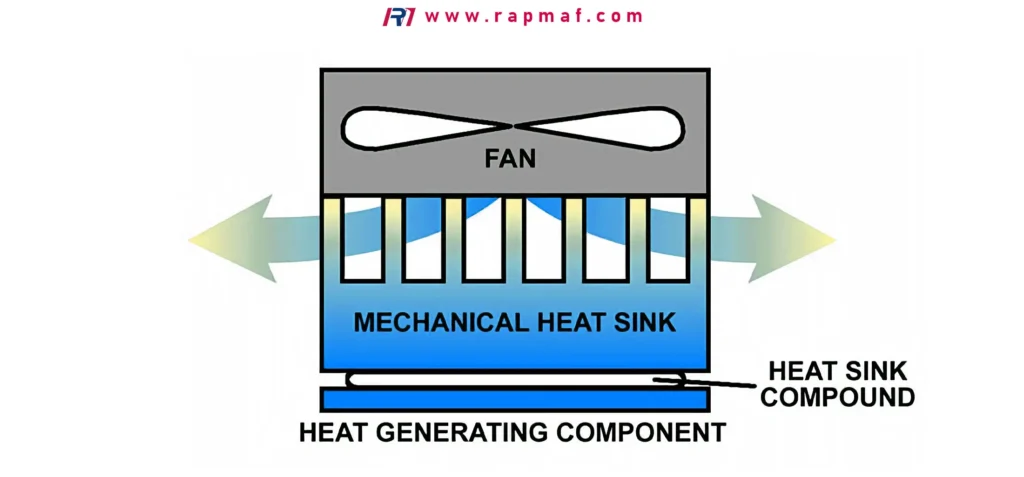
This is where the second and third laws of thermodynamics come into play. We need to transfer the heat from the solid metal fins into the surrounding fluid—the air. This is accomplished through two powerful, invisible forces: Convection and Radiation.
Principle 2: Convection – The Engine of Heat Removal
Convection is the transfer of heat through the movement of a fluid (like air or water). This is, by far, the most dominant and important process in almost all heatsink applications. However, convection isn’t a single concept; it’s a battle between two different approaches: passive and active.
Passive Cooling (Natural Convection): The Silent Approach
Imagine a radiator in your home in winter. It has no fans, yet it warms the entire room. This is natural convection at work.
- The air immediately surrounding the hot radiator fins gets heated by conduction.
- When air gets hot, its molecules spread out, making it less dense than the surrounding cooler air.
- Because it’s less dense, this hot air begins to rise.
- As the hot air rises, cooler, denser air is drawn in from below to take its place.
- This new cool air gets heated, rises, and the cycle continues.
This silent, continuous, and self-sustaining air current is called a convection current. A heatsink designed for passive cooling works the exact same way. It relies on this natural “chimney effect” to constantly cycle air over its fins.
- Advantage: Extreme reliability. With no moving parts, a passive heatsink cannot fail. It produces zero noise and requires no power.
- Disadvantage: It’s a relatively slow and gentle process. It can only dissipate a limited amount of heat. You won’t find a high-end gaming CPU being cooled by a passive heatsink alone.
Active Cooling (Forced Convection): Bringing in the Big Guns
Now, imagine blowing on a hot spoonful of soup. You aren’t making the air “colder,” you are simply replacing the hot, steamy air above the soup with cooler room-temperature air much, much faster than natural convection ever could. This is the principle of forced convection, and it’s the game-changer for high-performance cooling.
An active heatsink is simply a heatsink with a fan attached. The fan’s job is to force a massive volume of cool air across the heatsink’s fins at high speed. This dramatically accelerates the rate of convective heat transfer, allowing the heatsink to dissipate hundreds of watts of heat.
Expert Insight: Defeating the “Boundary Layer”
Why is a fan so much more effective? It’s because it defeats a microscopic enemy called the thermal boundary layer.
Air, like any fluid, has viscosity. A very thin layer of air molecules “sticks” to the surface of the heatsink fins. This stagnant layer of air gets hot but doesn’t move away easily, acting like a tiny insulating blanket that slows down heat transfer. In a passive cooler, the gentle convection currents have a hard time disturbing this layer.
A fan, however, creates a turbulent flow of air. This high-energy, chaotic airflow violently scrubs away the insulating boundary layer, allowing fresh, cool, fast-moving air to make direct contact with the fin’s surface. Think of a crowded hallway (the boundary layer) where people can barely move. A fan is like a security guard clearing a path, allowing a new group of people (cool air) to rush through. By constantly disrupting this boundary layer, a fan can increase the cooling efficiency of a heatsink by an order of magnitude.
Principle 3: Radiation – The Unsung Contributor
The final piece of the puzzle is thermal radiation. Every object with a temperature above absolute zero emits energy in the form of electromagnetic waves (specifically, infrared radiation). You feel this when you stand near hot coals from a fire—the heat you feel across the distance is primarily radiation.
A hot heatsink is constantly radiating thermal energy in all directions, which helps it lose heat. Unlike conduction and convection, radiation requires no medium; it can even happen in the perfect vacuum of space.
How important is it? In a typical desktop PC with a fan, radiation accounts for only a small fraction of the total heat dissipation; forced convection is the undisputed king. However, in a fanless (passive) system, radiation’s contribution becomes much more significant.
This is why many passive heatsinks are anodized black. A material’s effectiveness at radiating heat is measured by a property called emissivity. A perfect mirror has an emissivity near 0 (it reflects heat), while a perfect black body has an emissivity of 1.0 (it absorbs and emits heat perfectly). A shiny, bare aluminum heatsink is a poor radiator. By anodizing it black, its emissivity is increased to around 0.85, significantly boosting its ability to shed heat through radiation, and giving it a crucial performance edge in fanless applications.
Case Study: RM’s Passive Cooling Solution for the Factory Floor
A client in the industrial automation sector approached RM (Rapid Manufacturing) with a critical challenge. They needed to deploy a powerful control computer right next to a CNC milling machine. The environment was a heatsink’s worst nightmare: hot, filled with airborne dust and oil particulates, and subject to constant vibration.
The Problem: An active heatsink with a fan was not an option. The fan would quickly get clogged with dust and fail. The vibrations would also dramatically shorten the lifespan of the fan’s bearings. A system failure on this control computer would shut down a million-dollar production line. They needed a completely silent, maintenance-free, and utterly reliable cooling solution.
RM’s Engineering Solution: We designed a custom passive heatsink to cool the 120-watt processor.
- Massive Thermal Mass: We started with a large, solid block of 6061 aluminum as the heatsink’s core to absorb thermal spikes. A copper vapor chamber was embedded in the base to rapidly pull heat from the CPU and spread it across the entire heatsink body.
- Optimized Fin Design for Natural Convection: We knew the tightly packed fins of an active cooler would “choke” the gentle airflow of natural convection. Our design featured thick, robust fins with wide spacing (around 7-10mm apart) to minimize air resistance and encourage a strong, unimpeded convection current.
- Orientation is Everything: We machined the heatsink as part of the computer’s external chassis and specified that the unit must be mounted vertically. This ensures the fins act like a chimney, allowing the hot air to rise straight up and away, maximizing the efficiency of the convection cycle.
- Maximizing Radiation: The entire external chassis/heatsink was bead-blasted and then finished with a thick layer of matte black anodizing. This maximized the surface area on a micro level and gave it an emissivity of ~0.9, turning the entire computer case into an effective thermal radiator.
The Result: Our final design successfully cooled the processor under full load, with zero moving parts. It was completely impervious to dust and vibration, providing the client with the rock-solid reliability their production line demanded. It was a solution born not just from machining metal, but from a deep understanding of the physics of heat transfer.
From Physics to Physical Part: How Heatsinks Are Made
In the first two parts of this guide, we’ve taken a deep dive into the physics of thermal management. We’ve followed the journey of heat as it’s conducted from a tiny processor core, spread across a heatsink’s surface, and finally carried away into the air by the powerful forces of convection and radiation.
We’ve explored the theory. But how do we transform this theory into a precisely engineered physical object? A heatsink’s effectiveness is not just determined by its size or material, but also by its manufacturing method. The way a heatsink is made dictates its geometric complexity, its thermal efficiency, and its cost.
Here at RM (Rapid Manufacturing), we work with these methods every day. Let’s break down the most common manufacturing processes, from the mass-produced to the high-precision.
1. Extrusion: The Workhorse of the Industry
If you’ve ever looked inside a standard desktop computer, you’ve seen an extruded heatsink. This is, by far, the most common and cost-effective method for creating heatsinks in high volumes.
- The Process: Imagine squeezing toothpaste out of a tube. Extrusion works on a similar principle, but with incredible force and heat. A large, cylindrical billet of aluminum (usually 6061 or 6063 alloy) is heated until it becomes malleable. This hot aluminum is then forced by a powerful hydraulic ram through a steel die. The die is a hardened steel plate with a cross-sectional cutout of the desired fin profile. The aluminum flows through this opening, emerging on the other side as a long, continuous piece with the exact fin shape. This long extrusion is then cooled and cut to the desired lengths.
- Pros:
- Extremely Low Cost in High Volume: The initial cost of creating the die is high, but once it’s made, thousands of heatsinks can be produced very quickly and cheaply.
- Good Thermal Performance for the Price: The process creates a single, solid piece of metal, so there is no thermal resistance between the base and the fins.
- Cons:
- Limited Design Complexity: Extrusion only works in two dimensions. You can create complex fin profiles, but they must be consistent along the entire length of the heatsink. Cross-cuts or complex 3D shapes are impossible.
- Material Limitation: The process is almost exclusively used with aluminum alloys, as copper is much more difficult and expensive to extrude.
- Aspect Ratio Limits: You cannot make the fins infinitely tall and thin. There’s a limit to how complex the die can be and how well the aluminum will flow into it.
2. CNC Machining: The Ultimate in Precision and Flexibility
For applications where performance cannot be compromised, or when a unique design is required, CNC (Computer Numerical Control) machining is the gold standard.
- The Process: CNC machining is a subtractive process. It starts with a solid block (or “billet”) of material, such as high-grade aluminum or pure copper. This block is mounted in a sophisticated multi-axis milling machine. Guided by a precise digital 3D model, the machine uses a variety of spinning cutting tools to carve away material, layer by layer, until only the final, intricate shape of the heatsink remains.
- Pros:
- Near-Infinite Design Freedom: Anything that can be designed in 3D CAD software can be machined. This allows for complex pin-fin arrays, curved fins, integrated mounting points, and features perfectly tailored to the surrounding airflow and components.
- Material of Choice: Machining works equally well with aluminum and copper, allowing engineers to choose the absolute best material for the job (as we saw in the RM case study).
- Extreme Precision: CNC machines can hold tolerances measured in microns, ensuring a perfectly flat base for optimal contact with the heat source.
- Ideal for Prototyping and Low-to-Mid Volume: There are no tooling costs, making it the perfect method for creating and testing new designs or for production runs that don’t justify the cost of a die.
- Cons:
- Higher Per-Unit Cost: The process takes more time and generates more waste material (in the form of chips) than extrusion, making it more expensive for each finished part.
3. Bonded & Swaged Fin: The Hybrid Approach
What if you want the best of both worlds? The high performance of a copper base with the low cost and weight of aluminum fins? Bonded fin technology makes this possible.
- The Process: Instead of starting with a single block, this method uses a machined base plate (often copper) with grooves cut into it. Individual fins (often extruded aluminum) are then inserted into these grooves and permanently joined in place, typically using a thermal epoxy or by mechanically swaging (deforming) the base material to lock the fins in tight.
- Pros:
- Mixed-Material Designs: Allows for the ideal combination of materials.
- Very High Fin Density: Enables taller and more tightly packed fins than extrusion, creating massive surface area.
- Cons:
- Thermal Interface Resistance: The joint between the fin and the base, no matter how good, adds a small layer of thermal resistance that doesn’t exist in a solid, monolithic design.
4. Skived Fin: The High-Density Specialist
Skiving is a unique and clever process that creates extremely thin, high-density fins without an interface joint.
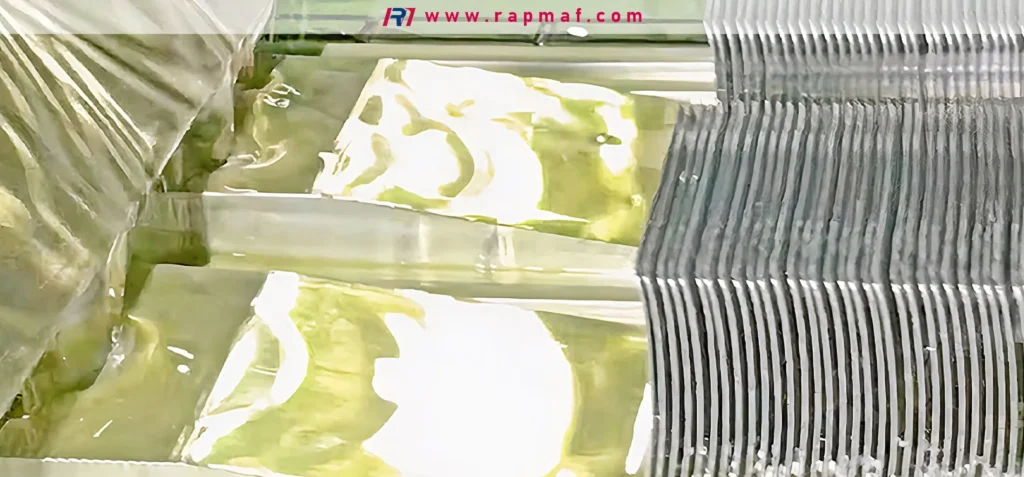
- The Process: A block of material (usually copper or aluminum) is passed against a special, razor-sharp cutting tool. Instead of cutting the material off, the tool is precisely controlled to “peel” a thin layer up from the block, bending it vertically to form a fin. The process is repeated dozens or hundreds of times, creating a dense array of fins that are integral to the base.
- Pros:
- Monolithic Construction: Like machining or extrusion, there is no thermal resistance between the fin and base.
- Highest Possible Fin Density: Skiving can produce thinner and more closely packed fins than any other method, maximizing surface area in a small volume.
- Cons:
- Specialized and Expensive: Requires dedicated machinery and is a more costly process.
- Delicate Fins: The extremely thin fins can be fragile.
Final Verdict: Choosing the Right Heatsink
- For Everyday Computing: A standard extruded aluminum heatsink with a fan offers the perfect balance of cost and performance for most CPUs and GPUs.
- For High-Performance Gaming & Overclocking: Look for designs that use machined copper bases, bonded fins, or skived fins to handle extreme heat loads.
- For Silent, Fanless, or Industrial Use: A large, passively cooled extruded or CNC machined heatsink, often anodized black to maximize radiation, is the most reliable choice.
- For Custom Prototypes & Mission-Critical Applications: When you need a perfect fit, maximum performance, and guaranteed reliability, a custom CNC machined heatsink is the definitive engineering solution.
Conclusion: More Than Just Metal
Throughout this guide, we’ve journeyed from the atomic vibrations that create heat to the thermodynamic forces that carry it away, and finally, to the advanced manufacturing techniques used to create the tools for the job.
The key takeaway is this: a heatsink is not a passive chunk of metal; it’s a dynamic and precisely engineered system. It’s a silent guardian, a thermal superhighway governed by the fundamental laws of physics. Its shape, material, and even its color are the result of deliberate engineering decisions designed to protect the delicate electronics that power our world. From the simple extruded cooler in your office PC to the complex, custom-machined solution keeping an industrial line running, the heatsink is a testament to the power of applied science.
At RM, we don’t just machine parts; we engineer solutions. If you’re facing a thermal challenge that requires more than an off-the-shelf answer, our team has the expertise in both physics and manufacturing to design and create the perfect thermal management solution for you. Contact us today to discuss your project.
Frequently Asked Questions (FAQ)
Q1: What is the process of a heat sink?
A1: A heatsink works through a three-step process. First, Conduction: Heat is pulled from a hot component (like a CPU) into the heatsink’s base and spreads throughout its fins. Second, Convection: Air flowing across the fins absorbs the heat and carries it away. This can be natural (passive) or fan-forced (active). Third, Radiation: The heatsink emits thermal energy as infrared waves, further cooling it down.
Q2: Is a heatsink good for a PC?
A2: It’s not just good; it’s essential. A modern computer processor generates so much heat in such a small area that it would destroy itself in seconds without a heatsink to draw that heat away. Every desktop, laptop, and server absolutely requires a heatsink to function.
Q3: Is a heatsink active cooling?
A3: A heatsink itself is a passive component, but it can be part of either a passive or an active cooling system. A passive cooling system uses just the heatsink, relying on natural convection. An active cooling system adds a fan to the heatsink to force air across it, dramatically increasing cooling performance. So, a heatsink isn’t inherently active, but it’s the core component of most active cooling solutions.
Q4: What is the best material for a heatsink?
A4: The two best and most common materials are copper and aluminum. Copper has a higher thermal conductivity (it moves heat faster), making it the ultimate performance choice, but it is heavier and more expensive. Aluminum has slightly lower conductivity but is much lighter and more affordable. Often, the best designs use a hybrid approach: a copper base for fast heat absorption and aluminum fins for efficient, lightweight dissipation.
References
- Çengel, Y. A., & Boles, M. A. (2019). Thermodynamics: An Engineering Approach (9th ed.). McGraw-Hill Education. Link to Publisher Page
- Incropera, F. P., DeWitt, D. P., Bergman, T. L., & Lavine, A. S. (2013). Fundamentals of Heat and Mass Transfer (7th ed.). Wiley. Link to Publisher Page
- Kalpakjian, S., & Schmid, S. R. (2020). Manufacturing Engineering & Technology (8th ed.). Pearson. (Provides detailed chapters on manufacturing processes like extrusion and CNC machining). Link to Publisher Page
Disclaimer
The information on this page is for informational purposes only. RM makes no representations or warranties, express or implied, as to the accuracy or completeness of this information. For any third-party services procured through the RM network, it is the buyer’s responsibility to specify and confirm performance parameters, tolerances, materials, and workmanship during the quotation process. For more detailed information, please do not hesitate to contact us.
RM: Your Precision Manufacturing Partner
RM is an industry leader in custom manufacturing solutions. With over 20 years of profound experience, we have become the trusted partner for more than 5,000 clients worldwide. We specialize in a comprehensive range of manufacturing services—including high-precision CNC machining, sheet metal fabrication, 3D printing, injection molding, and metal stamping—to provide you with a true one-stop-shop experience.
Our world-class facility is equipped with over 100 state-of-the-art 5-axis machining centers and operates in strict compliance with the ISO 9001:2015 quality management system. We are dedicated to providing solutions that blend speed, efficiency, and exceptional quality to customers in over 150 countries. From rapid prototyping to large-scale production, we promise delivery in as fast as 24 hours, helping you gain a competitive edge in the market. Choosing RM means selecting an efficient, reliable, and professional manufacturing ally.
Explore our capabilities today by visiting our website: www.rapmaf.com







10 Responses