



Summary: What is a DRO on a Metal Lathe?
A DRO (Digital Readout) on a metal lathe is a high-precision electronic measuring system that replaces the traditional mechanical hand dials. It consists of glass or magnetic scales mounted on the machine’s axes (carriage and cross-slide) and a digital display console. Its primary purpose is to show the exact position of the cutting tool in real-time, eliminating errors from backlash and the need for the operator to count handwheel revolutions. This results in dramatically increased accuracy, speed, and repeatability, making it arguably the single most valuable upgrade for any manual lathe.
| Feature | Without DRO (Hand Dials) | With DRO (Digital Readout) |
|---|---|---|
| Primary Function | Operator manually counts wheel turns to estimate tool position. | Electronically measures and displays the exact tool position. |
| Accuracy | Low to moderate; limited by dial resolution and backlash. | High; typically accurate to 0.0001″ (0.0025 mm) or better. |
| Backlash Error | A major source of error; operator must always “dial in” from the same direction. | Completely eliminated from the measurement; position is read from an independent scale. |
| Speed & Efficiency | Slow; requires constant stopping, measuring, and mental calculation. | Fast; allows for direct movement to target dimensions without stopping. |
| Key Advantage | Low initial cost; simple mechanical system. | Drastically reduces scrap, increases productivity, and enables complex operations. |
| Best For | Hobbyists on a tight budget; non-critical dimensioning. | Professional machine shops, precision engineering, and anyone seeking to maximize a lathe’s potential. |
I still remember the sound of my first mentor, Frank, tapping his pen on a complex drawing. “The numbers, Clive,” he’d say, “are the only things that don’t lie. Your handwheel might lie. Your eyes might lie. But the numbers on the print are the law.” For the first few years of my career, upholding that law was a grueling, nerve-wracking process of intense concentration.
Turning a shaft on an old manual lathe without a DRO is a ritual of feel, hearing, and, most of all, counting. You stand there, left hand on the carriage wheel, right hand on the cross-slide, and your entire brain is consumed by a stream of mental arithmetic. Okay, that’s one full revolution, that’s a hundred thou. Two revolutions, two hundred. Now I need another fifty-seven thou on the dial… wait, did I remember to account for the backlash?
Backlash. It’s the ghost in the machine. It’s the tiny bit of slop in the screw threads of the cross-slide and carriage. If you’re moving in one direction and then reverse, the handle will turn a few thousandths of an inch before the cutting tool actually starts moving again. You have to learn to feel it, to anticipate it, to always approach your final dimension from the same direction to keep it from ruining your part. It’s a constant, nagging source of error that preys on the slightest lapse in concentration.
One mistake, one lost count of a full revolution, and a part worth hundreds of dollars in material and hours of labor becomes a gleaming piece of scrap metal. I learned this the hard way on a long, stepped shaft for a hydraulic pump. I was on the final dimension, tired at the end of a long day. I needed to take off another 0.084″. I dialed it in, made the cut, and pulled back. I reached for my micrometer, my heart sinking as I saw the number. I had forgotten a full revolution of the handwheel. I’d taken off 0.184″ instead. The part was undersized, useless. Frank didn’t yell. He just looked at the part, then at me, and said, “The numbers don’t lie, son. But sometimes, our brains do.”
That’s the world before a DRO.
So, what is a DRO on a metal lathe? It is the liberation from that mental prison. It is the single greatest invention for manual machining since the carbide insert. It is, quite simply, a system that tells you the absolute, undeniable truth.
What Does DRO Stand For?
DRO is an acronym for Digital Readout. The name is perfectly descriptive. It is a system that reads the position of the machine’s components digitally and displays it on a screen. It doesn’t estimate, it doesn’t guess, and it doesn’t care about backlash.
Imagine taking a high-precision digital caliper and mounting its sliding scale along the bed of the lathe, with the reading head attached to the carriage. Then, imagine doing the same for the cross-slide. The DRO is essentially a dedicated, highly accurate set of digital calipers permanently integrated into your machine. The handwheels still move the machine, but you are no longer relying on their inscribed dials for measurement. Instead, you are watching a bright, clear digital display that tells you the tool’s exact position to within a ten-thousandth of an inch.
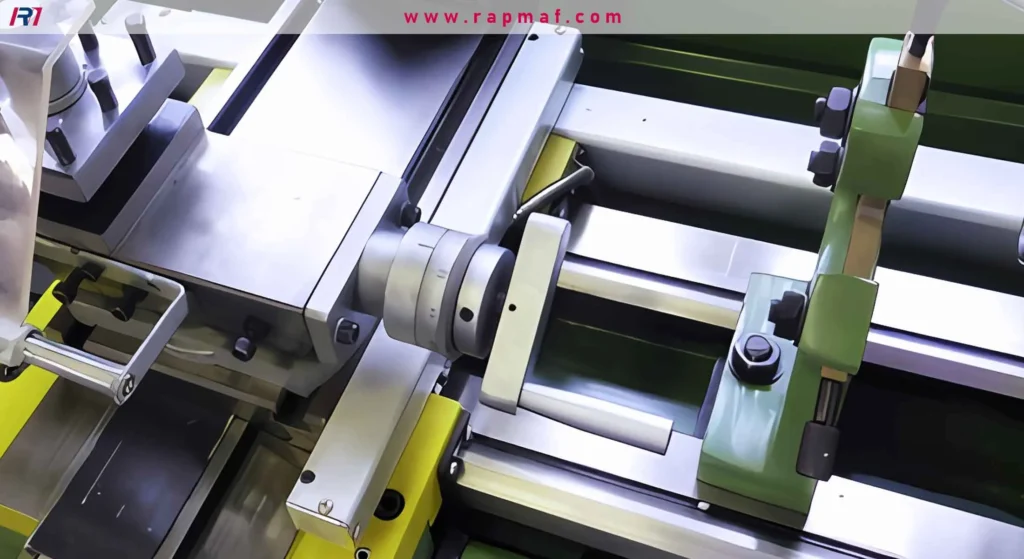
The system has three main components:
- The Scales: These are the precision “rulers” of the system. They are mounted to the stationary parts of the machine (like the lathe bed and the saddle).
- The Reading Heads (or Readers): These are the electronic “eyes” that move along the scales. They are mounted to the moving components (the carriage and the cross-slide). As they move, they read the fine markings on the scales.
- The Display Unit (or Console): This is the brain of the operation. It receives the signals from the reading heads, processes them, and displays the position on a screen as a numerical value.
When I finally got to use a lathe with a DRO installed, it was a revelation. It felt like I had been trying to navigate a dark room by counting my steps, and someone suddenly turned on the lights. The dreaded tapered shaft job came up again. Before, it was a nightmare of compound slide angles and careful measurements. With the DRO, it was simple. I zeroed the display at the start of the cut, engaged the power feed, and just watched the Z-axis (carriage) and X-axis (cross-slide) numbers. I could see the exact position of the tool at every moment. There was no more guessing, no more counting, no more fear. The numbers on the screen were the law, and for the first time, I could follow it perfectly.
We’ve now established what a DRO is and the problem it solves. But how does it really stack up against the old ways, and what are the different technologies that make these magic boxes work? In the next section, we will put the DRO in a head-to-head showdown with traditional hand dials and explore the critical differences between the two main types of DRO scales.
It’s one thing to say a tool makes you “more accurate.” It’s another thing entirely to live the transformation. Before the DRO, every critical job felt like performing open-heart surgery with a butter knife. You moved slowly, cautiously. You’d make a small cut, stop the machine, wipe away the chips and coolant, and bring in a micrometer. You’d check the dimension. Still five thousandths to go. You’d restart the machine, re-engage the tool, and creep up on the final number, your knuckles white on the handwheel. The entire process was a slow, deliberate dance of cut-stop-measure-repeat.
With a DRO, that dance becomes a fluid, confident stride. You know, with absolute certainty, where your tool is at all times. The bright numbers on the console don’t just give you data; they give you a profound sense of control and confidence that changes the very rhythm of your work.
How Does a DRO Fundamentally Change Lathe Work?
The change isn’t just incremental; it’s revolutionary. It elevates the machine and the operator from a system of estimations and workarounds to a system of precision and intent. To put it bluntly, a lathe without a DRO is a tool. A lathe with a DRO is an instrument. Let’s break down the practical differences in a head-to-head showdown.
| Feature | Manual Dials (The Old Way) | Digital Readout (The New Way) |
|---|---|---|
| Accuracy & Resolution | Limited by the engraved lines on the dial (typically 0.001″). Operator skill is needed to “split the thousandth.” | Limited only by the scale’s resolution, often 0.0001″ or 0.0002″. Ten times more precise than the dial. |
| Backlash Error | A constant and significant source of error. The operator must always approach the final cut from the same direction to compensate. | Completely eliminated. The scales measure the actual movement of the machine, not the screw’s rotation. |
| Speed & Productivity | Slow. The “cut-stop-measure-repeat” cycle is time-consuming. Mental calculations and counting revolutions slow down the process. | Extremely fast. The operator can move directly to the target dimension, often making the final cut in one pass without stopping. |
| Repeatability | Poor to fair. It’s difficult to return to the exact same spot or repeat a dimension perfectly, especially with multiple interruptions. | Excellent. The DRO can store positions and return to a zero point with perfect accuracy, time after time. |
| Error Rate | High. Lapses in concentration, misreading the dial, or forgetting a full revolution lead directly to scrapped parts. | Very low. The primary sources of human error (counting, backlash, misreading) are removed from the equation. |
| Ease of Use | Difficult to master. Requires a long apprenticeship to develop the “feel” for backlash and the discipline for constant calculation. | Intuitive and easy to learn. A new operator can produce accurate parts far more quickly than on a non-DRO machine. |
| Taper & Complex Cuts | Extremely difficult. Requires precise setting of the compound slide angle and complex trigonometry, with a high risk of error. | Simple. Many DROs have a taper-cutting function that calculates the required movement for you. |
I remember the first major project we landed after installing a DRO on our big Clausing lathe. It was a run of twenty custom spindles for a textile machine. Each spindle had five different diameters, three O-ring grooves, and a long, gentle taper at one end. Every single dimension had a tolerance of +/- 0.0005″. On the old manual lathe, that job would have been one machinist’s full-time nightmare for two weeks. The risk of scrapping a part on the final dimension would have been enormous. We would have quoted it high to cover the expected scrap rate.
With the DRO, it became a production job. I set my tool, touched off on the end of the part, and zeroed the Z-axis. I touched off on the outside diameter and zeroed the X-axis. From that point on, the drawing was my roadmap, and the DRO was my GPS.
- The first shoulder was at Z -1.500″. I just powered the carriage down until the display read
-1.5000and made my cut. Perfect. - The next diameter was 0.050″ smaller. The DRO has a diameter/radius function, so I just watched the X-axis display until I hit the target diameter. No math, no mistakes. Perfect.
- The O-ring grooves were a breeze. Move to the Z position, plunge in to the correct X diameter, move over 0.125″, and plunge again.
- The taper? I used the DRO’s taper function. It walked me through it. The result was a flawless, consistent taper on all twenty parts.
We finished the entire job in three days with zero scrapped parts. The DRO didn’t just pay for itself on that one job; it changed our entire business model. We could take on tighter tolerance work, quote more competitively, and deliver faster than our competition.
What Are the Different Types of DRO Scales?
The magic of the DRO doesn’t happen in the display box; that’s just the messenger. The real work happens in the scales and reading heads mounted on the machine. This is where the physical movement is converted into a digital signal. There are two dominant technologies used in modern DROs: the traditional Glass Scale and the more robust Magnetic Scale.
Glass Scales (Optical)
For decades, the glass scale was the undisputed king of precision measurement in DROs. It’s a marvel of optical engineering.
How do they work?
Imagine a long, narrow strip of high-quality glass. Etched onto this glass is a microscopic grating of thousands of incredibly fine, precise parallel lines, like a tiny barcode. Inside the reading head that slides along this glass, there’s a small LED light source on one side and a set of photo-sensors on the other. As the head moves, the light shines through the grating. The etched lines block the light, while the clear spaces let it pass through. This creates a pattern of flashing light, which the sensors detect as electrical pulses. By counting these pulses and analyzing their phase, the DRO’s brain can determine the exact position and direction of movement with breathtaking accuracy.
- Pros:
- Extreme Accuracy: Glass scales can offer the highest levels of resolution, making them ideal for ultra-precision grinding and milling applications.
- Proven Technology: They have a long and successful track record in the industry.
- Cons:
- Fragile: It’s a strip of glass. Drop a 10-pound chuck on it, and you have a very expensive pile of dust. They are almost always housed in a protective aluminum extrusion, but a heavy enough impact can still damage them.
- Susceptible to Contamination: The system relies on light. If cutting fluid, oil, or a fine cloud of cast iron dust gets inside the housing and coats the glass, it can block the light path and cause the reader to miscount or fail entirely.
I saw this happen once. A new apprentice was cleaning a machine with an air hose—something he was explicitly told never to do—and he blew a fine spray of coolant and chips directly into the lip seals of the Z-axis glass scale. The readout started jumping erratically. We had to stop production, carefully remove the entire scale assembly, and spend two hours meticulously cleaning the glass strip with lint-free cloths and alcohol. We were lucky we could save it.
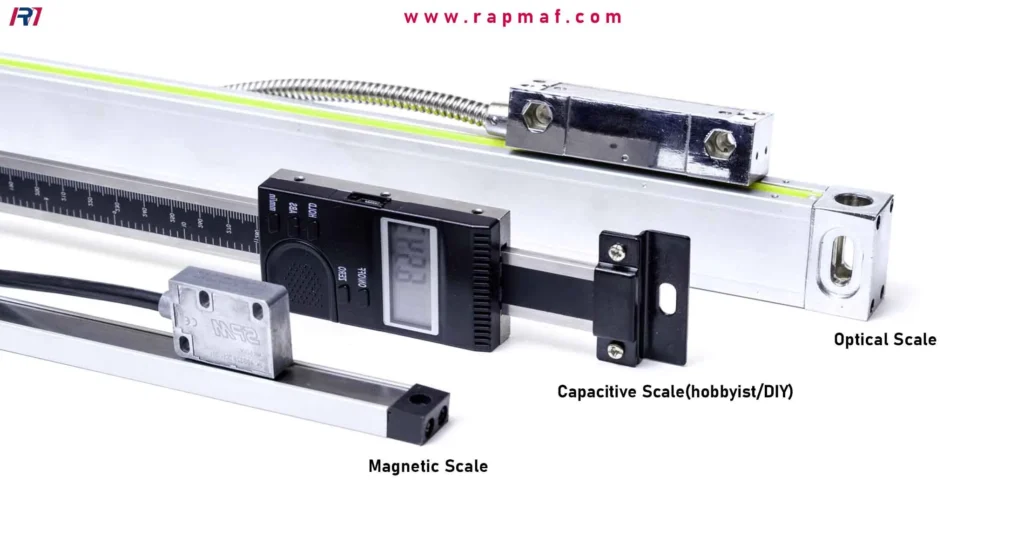
Magnetic Scales
Magnetic scales are the newer, tougher kids on the block. They were designed to overcome the fragility and contamination issues of glass scales, making them exceptionally well-suited for the often messy environment of a lathe.
How do they work?
Instead of a glass strip, a magnetic scale uses a flexible, rubber-like strip impregnated with tiny magnetic particles. These particles are recorded with a pattern of alternating north and south magnetic poles, spaced at a very precise interval. The reading head contains a sophisticated sensor (a magnetoresistive sensor) that detects the changes in the magnetic field as it passes over these poles. It converts these magnetic shifts into the same kind of electrical pulses that the optical system generates, which are then sent to the display.
- Pros:
- Durability: They are highly resistant to shock, vibration, and impact. There’s no glass to shatter.
- Immune to Contamination: The system reads magnetism, not light. It is completely unaffected by non-magnetic contaminants like coolant, oil, water, dust, and dirt.
- Easy Installation: The scales are often flexible and can be cut to a specific length with a special tool, making them easier to fit onto a wide variety of machines.
- Cons:
- Magnetic Debris: While immune to coolant, they can be affected by a buildup of magnetic chips (swarf) directly on the scale. However, they are typically very well-sealed in protective housings to prevent this.
- Resolution Limits (Historically): In the past, magnetic scales couldn’t match the absolute highest resolution of the best glass scales, but modern advancements have closed this gap significantly, and their accuracy is more than sufficient for even the most demanding lathe work.
When we bought a new lathe for the roughing area—a place constantly showered in hot chips and floods of coolant—Frank asked me to spec out the DRO. I didn’t hesitate. “Magnetic,” I said. “We need something that can survive out there.” It was the right call. That DRO has been running for ten years without a single issue, submerged in coolant and buried in chips, and it reads as true today as the day we installed it.
We now understand the hardware that provides the “truth,” but how do we use the console—the brain of the system—to command it? What do features like “Bolt Hole Circle” or “Tool Offsets” actually do for a lathe operator? In the final section, we will explore the five most powerful functions of a DRO console and the non-negotiable rules for installing one correctly.
We’ve now established the fundamental truth of the Digital Readout: its scales—whether optical or magnetic—are the source of its power. They are the incorruptible witnesses that report the machine’s true movement, banishing the mechanical ghosts of backlash and the human errors of miscounting. But that truth is useless if it can’t be communicated. The scales provide the raw data, but the console—the display box with its glowing numbers and cryptic buttons—is the brain of the operation. It’s the interpreter that translates that raw data into actionable intelligence for the machinist.
A basic display that simply shows X and Z coordinates is already a revolutionary leap from a hand dial. But the real power, the thing that separates a good DRO from a great one, is its ability to think. The advanced functions built into a modern DRO console are what truly transform a manual lathe into a semi-automated, error-proof instrument. They are the software that unlocks the full potential of the hardware.
What Advanced Functions Make a DRO a ‘Brain’ for the Lathe?
Frank used to call the DRO console “the co-pilot.” He said, “I’m still flying the machine, but it’s doing the navigation and the math for me, so I can focus on the cutting.” He was exactly right. These functions aren’t gimmicks; they are powerful tools designed to solve specific, recurring machining challenges. Mastering them is the difference between simply using a DRO and truly leveraging it.
1. Absolute vs. Incremental Modes (ABS/INC)
This is the most fundamental and powerful concept in the DRO universe. It’s the ability to have multiple coordinate systems running at the same time.
- Absolute (ABS) Mode: This is your “master” coordinate system. You set your absolute zero point at a fixed, permanent reference on the part—usually the end face (Z0) and the centerline or outside diameter (X0). This zero point never changes for the duration of the job. It’s the “home base” that all your drawing dimensions are referenced from.
- Incremental (INC) Mode: This is a temporary, “floating” zero. Think of it as the trip odometer in your car. You can zero it out at any point to measure the distance to your next turn, without losing your total mileage.
Here’s a practical example: Imagine turning a shaft with three shoulders.
- You face the end of the part and set your Absolute Z0.
- The first shoulder needs to be at Z -2.500″. You move the carriage until the ABS display reads
-2.5000. - Now, the next shoulder is 1.750″ further down from the first one. Instead of doing the math in your head (2.500 + 1.750 = 4.250), you simply press the “INC” button and zero the Z-axis at the first shoulder.
- Now you just move the carriage until the Incremental display reads
-1.7500. You’ve made your second move with zero calculation and zero chance of a math error. - All the while, your Absolute display has been tracking the total movement and now correctly reads
-4.2500, confirming your master position.
This single function eliminates the single greatest source of scrapped parts after backlash: cumulative error from mental math. It allows you to work directly from the dimensions on the print without a single calculation.
2. Tool Library / Tool Offsets
This function is a game-changer for any job that requires more than one cutting tool. On a manual lathe, if you switch from your roughing tool to a grooving tool, you have to re-establish your zero point. The tip of the grooving tool is in a different physical location than the tip of the turning tool. This process of re-touching off is slow and introduces opportunities for error.
A DRO with a tool library solves this completely. You tell the DRO’s brain, “I’m using Tool #1,” and you touch it off to set your master zero. Then you switch to Tool #2 (your grooving tool). You touch that off once and tell the DRO, “This is the position of Tool #2.” The DRO calculates the difference in X and Z between the two tool tips and stores it as an “offset.”
From that point on, you can switch between tools as much as you want. You just tell the DRO which tool is in the holder, and it automatically applies the correct offset. The numbers on the screen will always reflect the position of the current tool’s cutting edge, not the holder. For a complex part with turning, grooving, threading, and boring operations, this can save 30-40% of the total cycle time.
3. Bolt Hole Circle (BHC)
While primarily known as a milling machine function, the BHC feature is incredibly useful on a lathe for jobs requiring a pattern of drilled holes on the face of a part, like a flange or a flywheel.
Manually laying out a bolt circle is a tedious process involving dividers, a center punch, and often a rotary table. With a DRO, you indicate the center of your part as X0, Y0 (on a lathe, this is just X0). Then you access the BHC function and input a few simple parameters:
- The diameter of the circle.
- The number of holes.
- The starting angle (e.g., 0 degrees at the 3 o’clock position).
The DRO instantly calculates the X and Z coordinates for every single hole in the pattern. The display will then guide you. It will say, “Move to Z: [coordinate]” and “Move to X: [coordinate]” for Hole #1. You move the cross slide and carriage until the displays match, lock them, and drill the hole. Then you press a button, and the DRO gives you the coordinates for Hole #2. It’s a perfect, foolproof, digital layout tool that reduces a one-hour layout job to a five-minute operation.
4. Taper Calculation
Cutting a precise, long taper on a manual lathe is one of the most difficult tasks. It involves either setting the compound slide to a precise angle (and limiting you to a very short taper) or painstakingly setting over the tailstock, which is a black art of trial and error.
A DRO with a taper function simplifies this immensely. It allows you to cut any taper over any length using the power feed of the carriage. The DRO guides you by linking the movement of the Z-axis (the carriage) and the X-axis (the cross slide). As you engage the carriage feed, the DRO screen will show you the real-time position of the Z-axis. It will also show you a “target” X-axis position that you need to be at for that given Z position to maintain the correct angle. Your job is to simply turn the cross slide handwheel smoothly to make your X-axis display match the target number as the carriage moves. It turns a complex calculation into a simple “follow the numbers” exercise, resulting in a perfect taper every time.
Why is Meticulous Installation the Key to DRO Accuracy?
You can buy the most expensive, highest-resolution DRO system in the world, but if you install it poorly, you might as well be using a tape measure. The installation is the physical link between the machine’s movement and the DRO’s scales. Any error in this link becomes an error in every part you make. When Frank and I installed our first DRO, he treated it with the same reverence as setting the foundation for a new building. “The foundation has to be perfect, Clive,” he’d say. “Everything else is built on top of it.”
Here are the non-negotiable commandments of DRO installation:
Rule 1: Rigidity is Non-Negotiable
The brackets that hold the scales and reading heads must be absolutely, unshakably solid. Any flex, sag, or vibration in these mounts will be interpreted by the reading head as machine movement. We once tried to save time by fabbing up a quick bracket for a cross-slide scale out of a piece of thin angle iron. The first part we made was all over the place. We discovered that the cutting forces were causing the flimsy bracket to flex by a few thousandths of an inch—an error that went straight to the display. We scrapped the bracket and machined a new one from a solid block of half-inch steel. Problem solved. The brackets must be an extension of the machine’s casting, not an afterthought.
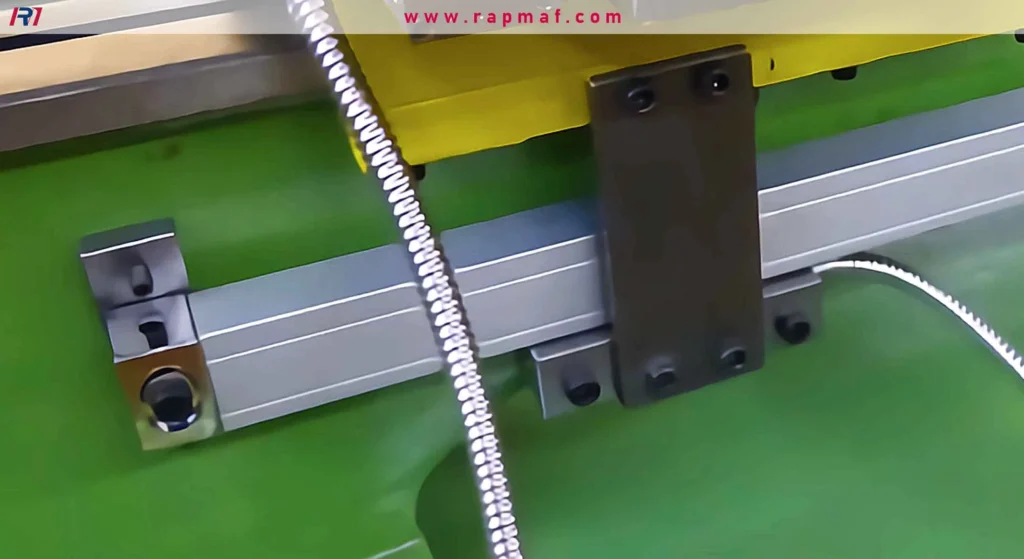
Rule 2: Alignment Must Be Perfect (The Cosine Error)
This is the most critical and most misunderstood aspect of installation. The scale must be perfectly parallel to the axis of travel it is measuring. If your Z-axis scale (mounted along the bed) is even slightly crooked, it will introduce a “cosine error.”
Imagine the scale is misaligned by just one degree. As the carriage travels 10 inches along the bed (the adjacent side of a right triangle), the reading head travels along the hypotenuse of that triangle. The distance the head travels is slightly longer than the actual machine movement. The error is calculated as: Actual Travel * (1 - cos(angle)). For a 1-degree misalignment over a 10-inch travel, the error is about 0.0015″—a huge and unacceptable discrepancy. For a 20-inch travel, it doubles to 0.003″. The only way to avoid this is to use a high-quality dial test indicator and run it along the length of the scale body, adjusting it until it is perfectly parallel to the ways of the lathe.
Rule 3: Protect Your Wires
The armored cables that connect the reading heads to the console are the system’s nervous system. They must be routed carefully, ensuring they have enough slack to move through the full travel of the machine without being stretched or pinched. They must be secured away from hot chips, spinning chucks, and sharp edges. A snagged cable can not only destroy the cable but also rip the delicate connector off the reading head, resulting in an expensive repair. Use zip ties, P-clamps, and flexible conduit to create a safe, clear path for all wiring.
Rule 4: Grounding and Electrical Noise
A machine shop is a noisy electrical environment. The large motor starting, a variable frequency drive (VFD) running, or even a nearby welder can all introduce electrical noise that can interfere with the low-voltage signals from the reading heads. Proper grounding of the DRO console to the machine’s chassis is essential to provide a clean signal path and prevent the readings from jumping or freezing.
Rule 5: Calibration and Verification
Once everything is installed, the final step is to prove its accuracy. You don’t just trust the numbers; you verify them. We would do this by mounting a dial test indicator on the cross slide and bringing it up against a set of precision gauge blocks stacked on the carriage. We’d zero the indicator and the DRO. Then we’d move the cross slide by a known amount, say 1.0000″ on the DRO display, and check to see if the indicator also read exactly 1.000″. This final check is the ultimate confirmation that the entire system—from the scales to the brackets to the console—is working as one precise, unified whole.
Conclusion: More Than a Measurement
When someone asks, “What is a DRO on a metal lathe?” the simple answer is “a digital measuring device.” But that answer is woefully incomplete. It’s like calling a calculator “a device that makes marks on paper.”
A DRO is a system for eliminating error. It eliminates the mechanical error of backlash. It eliminates the mathematical errors of complex calculations. It eliminates the human errors of misreading a dial, of losing your place, of a momentary lapse in concentration.
It is a tool that grants the machinist confidence—confidence to move directly to a dimension, to trust the numbers on the screen, and to focus their skill on the part that matters: the art and science of the cutting edge. It doesn’t replace the skill of the operator, but rather amplifies it, clearing away the mental clutter and mechanical uncertainty, allowing for a purer, more direct path from the blueprint to the finished part. It is, without a doubt, the single greatest upgrade you can make to a manual machine, transforming it from a simple tool into a modern instrument of precision.
Frequently Asked Questions (FAQs)
1. Can I install a DRO on my lathe myself?
Yes, absolutely. If you are mechanically inclined, have good attention to detail, and have the tools to fabricate sturdy mounting brackets, a DIY installation is very achievable. The key is to follow the manufacturer’s instructions precisely, especially regarding the alignment of the scales to prevent cosine error. Take your time and use a dial indicator to verify your work.
2. What is the difference between a 2-axis and 3-axis DRO for a lathe?
A standard lathe DRO is 2-axis, measuring the carriage movement along the bed (Z-axis) and the cross-slide movement in and out (X-axis). A 3-axis DRO adds a third scale to the compound slide. This is particularly useful for precision threading and cutting complex or steep angles, as it provides a direct reading of the compound’s movement instead of relying on its small, often inaccurate dial.
3. Do I need to clean the DRO scales?
Modern scales, especially magnetic ones, are very well-sealed and generally maintenance-free. However, it’s good practice to periodically wipe down the outside of the aluminum extrusions and the lip seals to prevent a heavy buildup of chips and grime that could eventually work their way inside. Never spray compressed air or high-pressure coolant directly at the seals.
4. What does “resolution” mean in a DRO’s specifications?
Resolution refers to the smallest unit of measurement the DRO system can display. A common resolution for lathe work is 0.0002″ or 0.0005″ (which translates to 0.0004″ or 0.001″ on the diameter). This means the system can detect movement as small as two ten-thousandths of an inch. While higher resolution sounds better, it’s important to match the DRO’s resolution to the overall accuracy of your lathe.
5. Is a DRO worth the cost for a hobbyist?
For a hobbyist, a DRO is arguably one of the best investments you can make. It dramatically shortens the learning curve by eliminating the need to master the frustrating nuances of backlash and dial counting. It allows you to produce accurate parts much more quickly and with far less scrap, making the hobby more enjoyable and rewarding.
References
- Acu-Rite. (n.d.). DRO100/200/300 Digital Readouts. Retrieved from https://www.acu-rite.com/digital-readouts/
- Newall. (n.d.). Why Choose Newall? Retrieved from https://www.newall.com/why-newall
- Machine Tool Engineering. (2021). The Importance of Correct DRO Scale Installation. Retrieved from https://www.mte.net/dro-installation-guide
Disclaimer
The information on this page is for informational purposes only. RM makes no representations or warranties, express or implied, as to the accuracy or completeness of this information. For any third-party services procured through the RM network, it is the buyer’s responsibility to specify and confirm performance parameters, tolerances, materials, and workmanship during the quotation process. For more detailed information, please do not hesitate to contact us.
RM: Your Precision Manufacturing Partner
RM is an industry leader in custom manufacturing solutions. With over 20 years of profound experience, we have become the trusted partner for more than 5,000 clients worldwide. We specialize in a comprehensive range of manufacturing services—including high-precision CNC machining, sheet metal fabrication, 3D printing, injection molding, and metal stamping—to provide you with a true one-stop-shop experience.
Our world-class facility is equipped with over 100 state-of-the-art 5-axis machining centers and operates in strict compliance with the ISO 9001:2015 quality management system. We are dedicated to providing solutions that blend speed, efficiency, and exceptional quality to customers in over 150 countries. From rapid prototyping to large-scale production, we promise delivery in as fast as 24 hours, helping you gain a competitive edge in the market. Choosing RM means selecting an efficient, reliable, and professional manufacturing ally.
Explore our capabilities today by visiting our website: www.rapmaf.com






