



GD&T (Geometric Dimensioning & Tolerancing) is supposed to remove ambiguity—yet many production delays still come from perfectly “legal” GD&T that’s hard (or expensive) to manufacture and inspect.
This guide focuses on the most common GD&T mistakes we see in real RFQs and supplier–customer handoffs, using plain-language explanations and practical fixes. You’ll also get a short checklist you can use to send a cleaner drawing package and get a faster, more accurate quote.
Standards note: GD&T practices vary depending on whether you follow ASME Y14.5 or ISO 1101. The concepts below are broadly applicable, but always align your drawing with the governing standard listed in your title block.
GD&T In Simple Terms (Why It Exists)
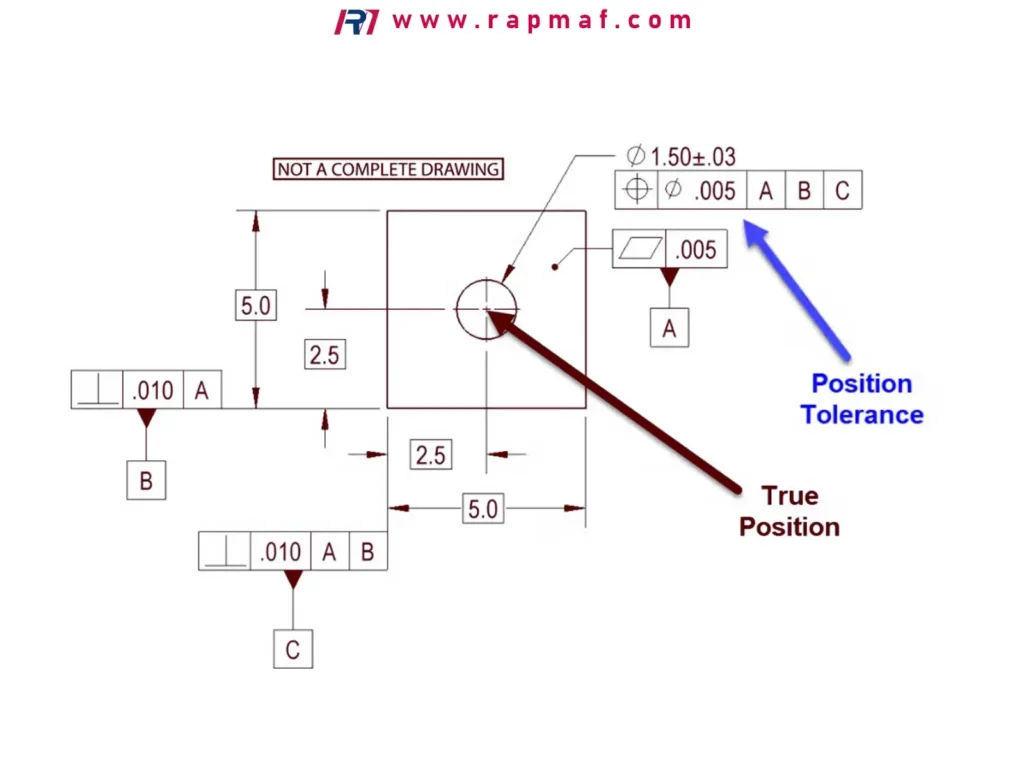
GD&T tells manufacturing and inspection what “good” looks like in 3D—not just how big something is, but:
- where it is (Location)
- how it’s oriented (Perpendicularity/Angularity/Parallelism)
- how it forms (Flatness/Straightness/Cylindricity)
- how it relates to a reference system (Datums)
A good GD&T scheme reduces arguments. A bad scheme increases:
- scrap (parts that “measure okay” but don’t assemble)
- cost (extra setups, tighter processes)
- inspection time (more complex CMM programming, more fixturing)
The 10 Most Common GD&T Mistakes (With Fixes)
Mistake 1 — Datum scheme doesn’t match how the part is used
Symptom: Parts pass inspection but fail assembly, or require “hand fitting.”
Root cause: Datums reflect drawing convenience, not functional interfaces.
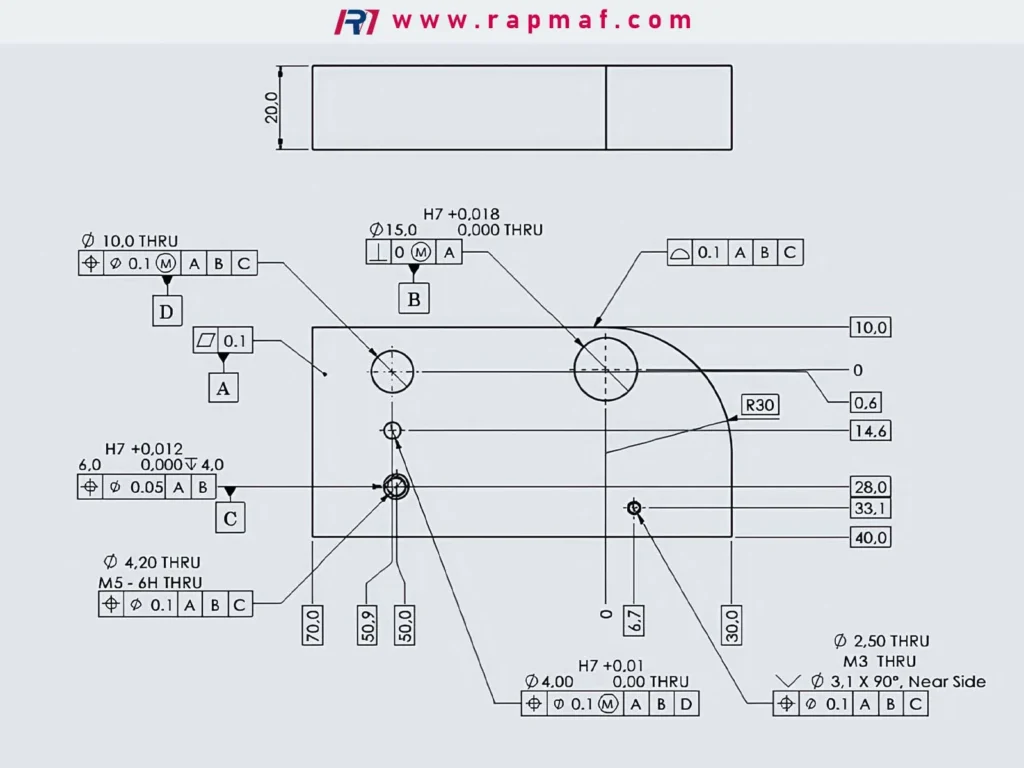
Fix: Choose datums based on function:
- Primary datum (A): the surface that seats against the mating part (most stable contact)
- Secondary (B): the feature that clocks rotation (often a hole, slot, or face)
- Tertiary (C): the feature that locks the last degree of freedom
Practical tip: If your assembly uses two dowel pins, make those holes part of the datum system (or reference them properly). If it uses a mounting face, that face is usually datum A.
Representative scenario (assembly failure)
A bracket is inspected with datum A as the “largest face,” but in assembly the bracket seats on a smaller machined pad. The pad isn’t controlled tightly, so the bracket rocks slightly. Hole position is technically in tolerance relative to the “largest face,” yet the real assembly datum is different—so the holes don’t line up.
Correction: Make the seating pad datum A, not the cosmetic face.
Mistake 2 — Overusing tight tolerances because “we want it accurate”
Symptom: Quotes come back high, lead times extend, suppliers push back.
Root cause: Tight GD&T applied everywhere instead of only where it matters.
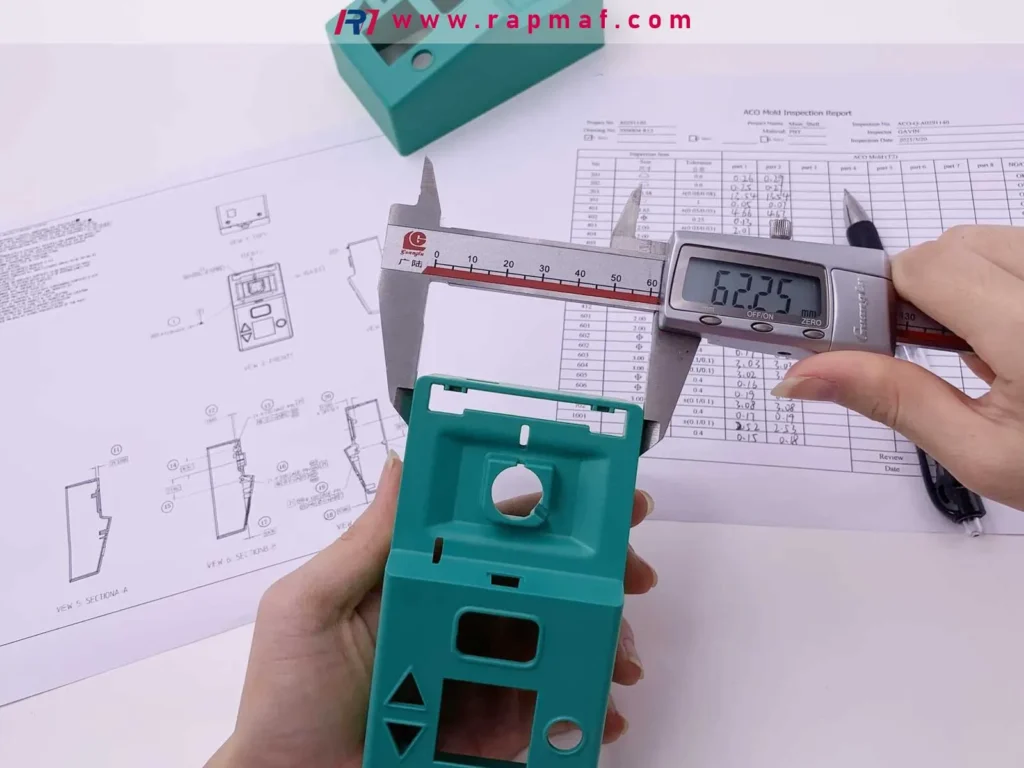
Fix: Apply tight control only to functional features:
- sealing surfaces
- bearing bores
- locating holes for pins
- critical mating faces
Everything else can usually be looser:
- exterior non-mating faces
- internal pockets that don’t locate anything
- cosmetic features (control by surface finish, not ultra-tight position)
Buyer reality: Tight tolerances don’t just increase machining cost—they increase inspection cost and risk of rework.
Mistake 3 — Position tolerance without defining a usable datum reference frame
Symptom: Supplier asks: “What are B and C?” or “Which face is the clocking face?”
Root cause: A position callout references a datum that is not clearly defined, not measurable, or not stable.
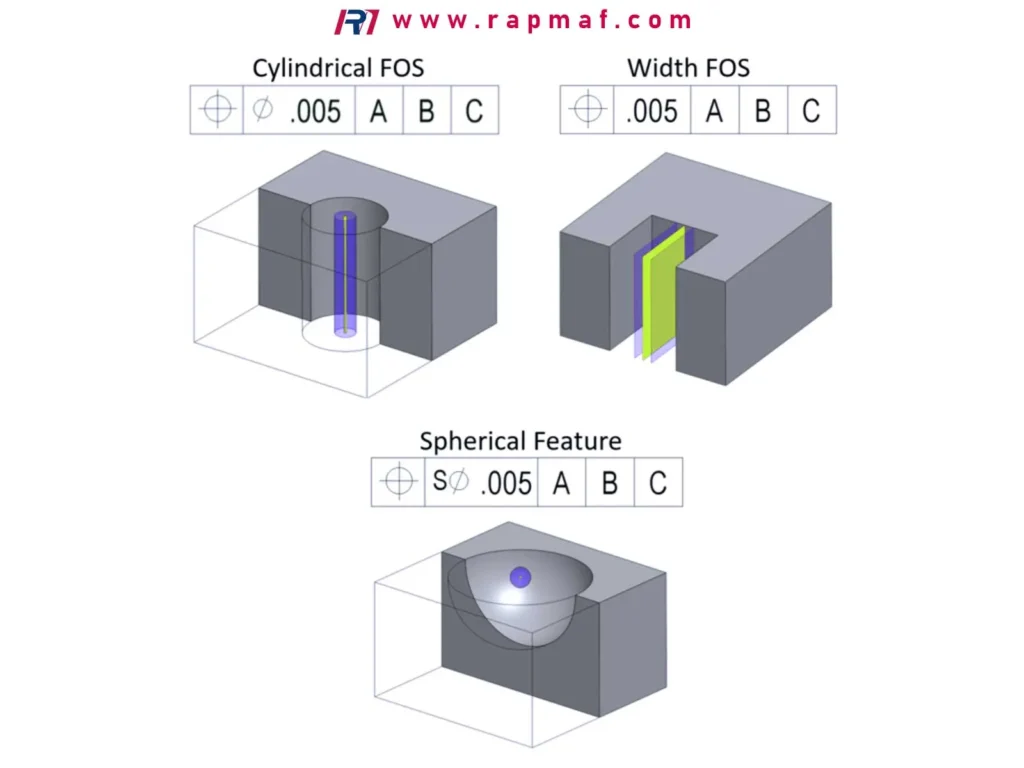
Fix: Ensure datums are:
- clearly identified on the drawing
- physically accessible for measurement
- stable and repeatable in fixturing
Better practice: Prefer datum features that naturally locate the part: a ground face, a bore, a true locating boss—not a tiny edge break.
Mistake 4 — Confusing flatness/perpendicularity/parallelism with profile
Symptom: Complex profile tolerances used where simple controls would work.
Root cause: Profile is used as a “catch-all” because it sounds comprehensive.
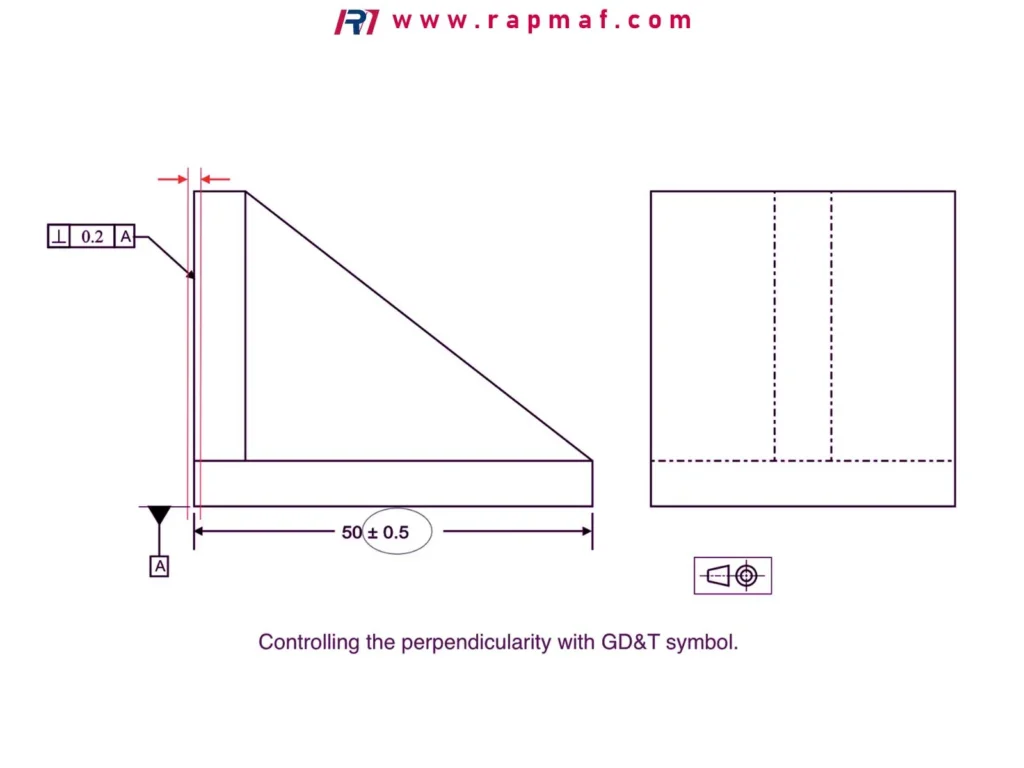
Fix: Use the simplest control that defines the requirement:
- Flatness: controls a surface without referencing a datum
- Parallelism/Perpendicularity: controls orientation relative to datum(s)
- Profile: controls surface shape and (often) its relation to datums
Cost note: Broad profile callouts can force full-surface scanning inspection.
Mistake 5 — Applying profile to too many surfaces at once
Symptom: A single profile note seems elegant; the quote and inspection plan become heavy.
Root cause: A global profile requirement makes many surfaces “functional” by default.
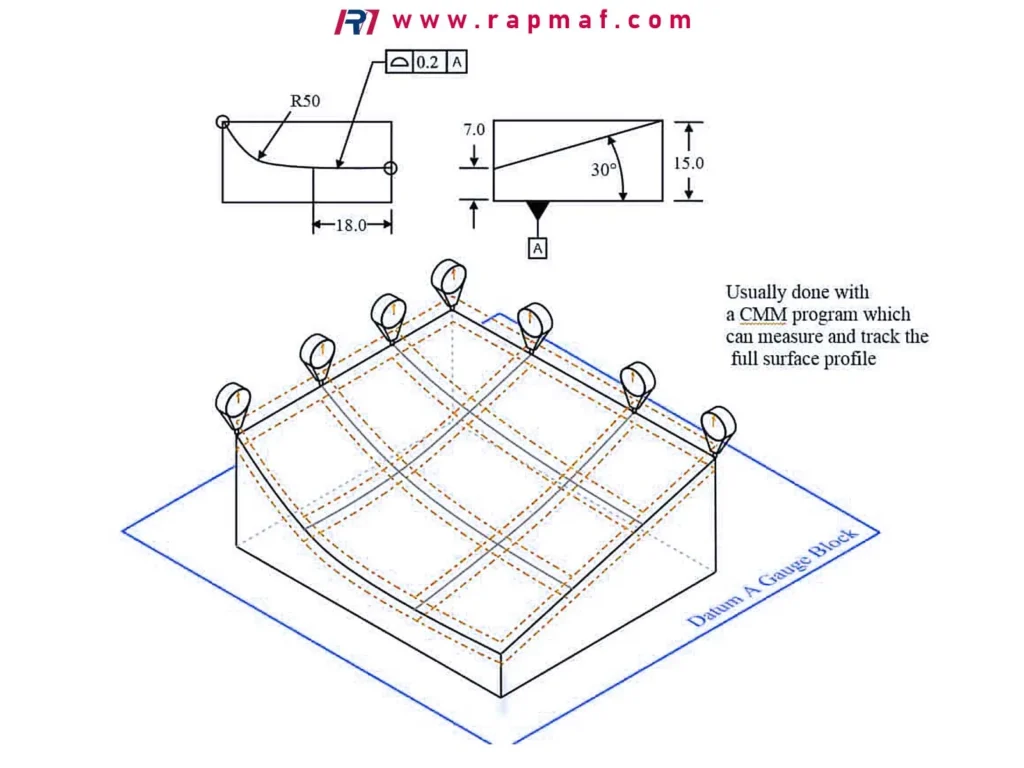
Fix: Split profile into zones:
- profile tight on mating/flow/seal surfaces
- profile loose on cosmetic/non-contact surfaces
- no profile at all on non-critical internal geometry
Rule of thumb: If a surface never touches anything and doesn’t locate anything, it rarely needs a tight profile.
Mistake 6 — MMC used automatically (or used where it hurts function)
Symptom: Someone adds Ⓜ (MMC) to position “to be safe,” but the assembly still fails occasionally.
Root cause: MMC changes the functional meaning: it allows bonus tolerance as size departs from MMC.

Fix: Use MMC deliberately:
- Use MMC for clearance holes where larger holes genuinely increase assembly clearance.
- Avoid MMC when the function requires a consistent location regardless of size (some alignment features, sealing-related patterns, precision alignment).
If I were choosing:
- For a clearance bolt hole pattern: Position at MMC often makes sense.
- For dowel pin holes driving alignment: Position at RFS is often safer.
Mistake 7 — Datum targets missing on irregular or cast surfaces
Symptom: Drawing uses a rough/curved surface as datum A without defining targets.
Root cause: Real parts vary; inspection can’t “settle” the part consistently.
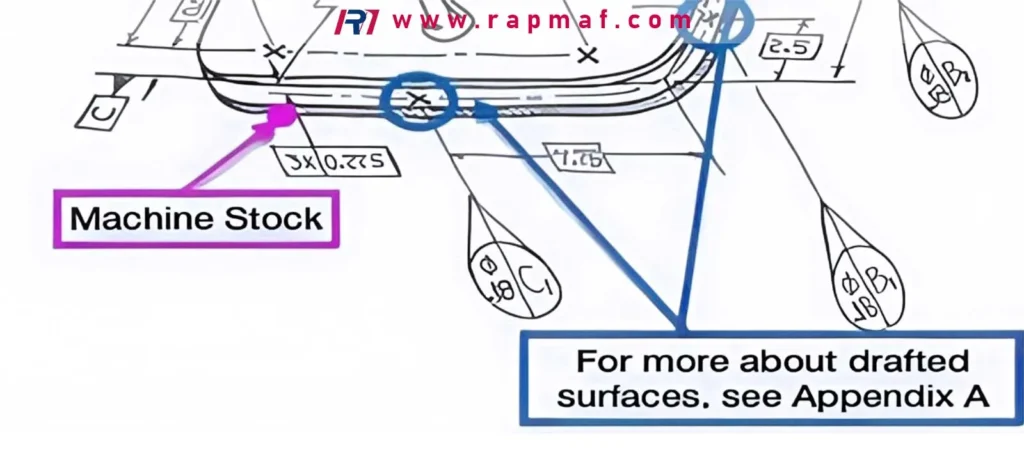
Fix: Use datum targets on non-ideal surfaces, or specify machined datum pads.
Result: More stable fixturing, less argument between shop and inspection.
Mistake 8 — Ignoring Rule #1 (size limits) and then being surprised
Symptom: A feature meets size tolerance, but form is poor; assembly binds.
Root cause: Misunderstanding how size tolerances relate to form control.
Fix: Understand the governing standard and how size limits constrain form at MMC (ASME concept). When in doubt, call out the form explicitly on critical features:
- cylindricity or straightness for shafts
- roundness/cylindricity for bores
- flatness for sealing faces
Mistake 9 — Using too many datums (or a datum “chain” that amplifies error)
Symptom: Inspection is inconsistent between suppliers; different fixture strategies yield different results.
Root cause: Over-constrained or indirect datum references.
Fix: Keep the datum reference frame minimal and functional:
- A-B-C should lock 6 DOF cleanly
- avoid referencing tertiary datums for things that don’t need them
- don’t chain dimensioning off features that themselves float
Mistake 10 — GD&T is correct, but not inspectable in the real world
Symptom: Supplier can machine it, but the inspection method is unclear or too expensive.
Root cause: Callouts require scanning, special fixturing, or unclear measurement definition.
Fix: For each critical callout, ask:
- Can this be inspected with a normal CMM setup?
- Do we need a functional gauge?
- Should we define the inspection method in notes (when appropriate)?
- Do we need a measurement plan agreement (for high-risk parts)?
Common GD&T Symbols You’ll See (And What They Really Control)
Below are the symbols most often involved in quoting and inspection discussions:
Position (⌀ / Position symbol)
Controls the location of a feature (hole, pin, slot) relative to datums—often the #1 driver for assembly fit.
Where it goes wrong: position called out without a functional datum scheme.
Profile of a Surface / Profile of a Line
Controls form and can control location/orientation relative to datums.
Where it goes wrong: used globally or too tight on non-functional surfaces.
Flatness / Straightness
Controls form without datums. Great for sealing pads or sliding faces.
Where it goes wrong: using orientation controls when you actually need form, or vice versa.
Perpendicularity / Parallelism
Controls orientation relative to datum(s).
Where it goes wrong: datum not stable, or orientation tolerance too tight for the feature’s real function.
Runout / Total Runout
Important for rotating parts: controls variation relative to a datum axis.
Where it goes wrong: datum axis not defined robustly (e.g., referencing a thread instead of a true bore), or missing a realistic inspection plan.
The “321 Rule” (Why It Matters In Real Fixtures)
Many GD&T setups implicitly follow a 3-2-1 locating principle:
- 3 points establish a primary plane (datum A)
- 2 points establish a secondary plane/line (datum B)
- 1 point establishes the final constraint (datum C)
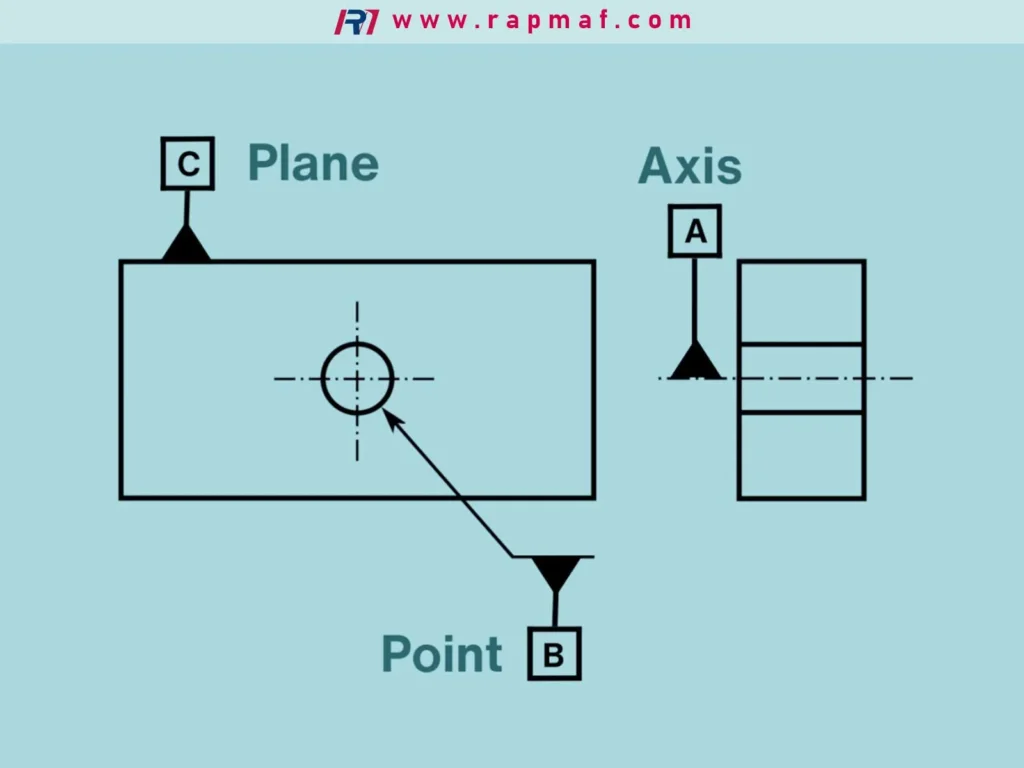
If your datums don’t allow a stable 3-2-1 location, the part may be “floating” during inspection and machining—creating inconsistent results even if everyone is trying to do the right thing.
Practical Examples You Can Reuse (Clean Callouts)
These are representative examples you can adapt (not tied to any specific customer or project).
Example A — Bolt hole pattern on a mounting plate
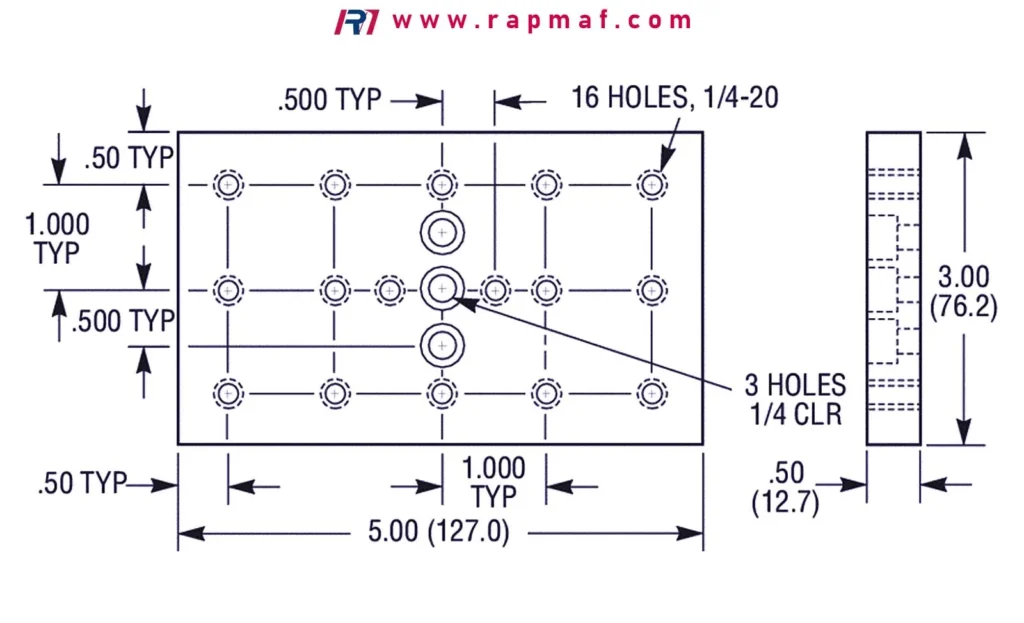
Goal: Easy assembly with bolts; cost-efficient manufacturing.
- Datum A: mounting face
- Datum B: long edge (clocks rotation)
- Datum C: short edge (locks position)
- Hole size: clearance hole
- Hole pattern: Position tolerance, often at MMC (if it’s truly clearance)
Why: As holes get larger (depart from MMC), extra location tolerance is acceptable.
Example B — Dowel pin holes for precision alignment
Goal: Repeatable location; tight alignment.
- Datum A: functional seating face
- Datum B: first dowel hole axis
- Datum C: second dowel hole axis (or a clocking face, depending on design intent)
- Pin holes: Position tolerance, often RFS
Why: You care about alignment, not “bonus” from size drift.
Example C — Cosmetic cover with minimal functional features
Goal: Keep cost low; avoid over-inspecting.
- Use simple linear tolerances for non-functional geometry
- Use profile only on snap-fit or sealing perimeter surfaces
- Avoid global profile across the whole shell unless truly required
How To Reduce Quote Time (And Avoid Surprise Cost)
If you want faster, cleaner quotes—and fewer “we need clarification” loops—do these three things:
1) Mark truly critical features
On the drawing or in a controlled note list:
- CTQ/Key Characteristics
- functional datums
- inspection reporting needs (FAI, CMM report, gauge method)
2) Specify the GD&T standard
In the title block: ASME Y14.5 or ISO 1101 (and revision).
This alone prevents a lot of interpretation drift.
3) Match GD&T to the manufacturing process
If you’re planning a cost-effective CNC process:
- avoid ultra-tight profile on large freeform surfaces unless necessary
- avoid datum features that are difficult to fixture
- consider adding datum pads or measurable features if you need reliable inspection
RFQ Checklist (Short, Practical, Quote-Ready)
Send this with your RFQ to reduce risk and back-and-forth:
Geometry & files
- 3D CAD (STEP preferred) + 2D drawing (PDF)
- GD&T standard in title block (ASME/ISO) and revision
Function & risk
- What the part does (mounting plate? alignment bracket? rotating component?)
- Identify critical-to-function features (datums, hole patterns, sealing surfaces)
Production intent
- Material and condition (and whether heat treat/coating applies)
- Quantity (prototype / pilot / production) + target due date
Inspection package
- Required inspection outputs (CMM report? first article? gauge method?)
- Any customer-specific measurement rules (sampling, GR&R expectations)
If I Were Choosing: A Simple Decision Guide
If assembly is failing or “tight sometimes”
I would first audit the datum scheme and the position callouts before tightening tolerances. Tightening without fixing datums often just increases cost while keeping the real failure mode.
If cost is too high
I would:
- loosen non-functional profile/position tolerances
- remove global profile and replace with targeted controls
- confirm MMC is used only where it truly provides assembly benefit
If inspection is taking too long
I would:
- consolidate CTQs
- ensure datums are accessible
- define a reasonable inspection plan for complex profile surfaces (or redesign for inspectability)
References (Primary Standards + Practical Reading)
- ASME Y14.5 (Geometric Dimensioning and Tolerancing) — purchase via ASME
- ISO 1101 (Geometrical product specifications — Geometrical tolerancing) — via ISO
- NIST (measurement concepts and metrology background): https://www.nist.gov/
(For actual GD&T application, always treat ASME/ISO standards and your customer requirements as the governing references.)
Need A Fast Manufacturability Check Before You Release The Drawing?
If you’re not sure whether your GD&T is manufacturing-friendly, send your STEP + drawing and highlight the features that drive function (datums, hole patterns, sealing faces). We’ll come back with practical DFM feedback—what’s high risk, what’s over-specified, and what to change to reduce cost and inspection burden before the first part is cut.






